Site Moved

This site has been moved to a new location - Bin-Blog. All new post will appear at the new location.

Bin-Blog

Ajax Data Transfer Format - UED(Url Encoded Data)

JSON has taken the award for the easiest method for transporting data when using Ajax. JSON is great to get data from the server side to the client side. What what about when you need to send data to the server side? Sure you can use JSON then - but the advantage of using JSON is lost. So I propose using another format for it - UED or URL Encoded Data. Its a very simple concept - and it has been in use for a long time - all I have done is create a function that will encode the data into this format. The basic concept behind this is that the most used data structures can be easily encoded into a URL. You can create variables, numerical arrays, associative arrays, multi-level arrays etc. using existing syntax. The best part is all the server side languages are capable of handling this format - so no parsing is needed.

ued_encode() will take an array as its argument and return the data encoded in UED format - as a string. You can use that string to send the data via POST or GET in the query part of the URL.

Demonstration

See ued_encode() in action.

Usage


var arr = {
 'name':"Binny",
 'year':2007,
 'quote':"Hello, World!",
 'os':['Windows','Linux','Mac'],
 'software':{
  'editor':"vi",
  'audio':"xmms",
  'video':"vlc"
 }
}
var data = ued_encode(arr);

Code

ued_encode.js - <1 KB

Read More...

Updated version of jx Ajax Library

The smallest Ajax library - jx has been very useful for me - so much that it found its way to the common.js file of the Bin-Co site. So I thought that I will release a slightly updated version.


// jx Library - http://binnyva.blogspot.com/2006/02/jx-ajax-library-in-object-notation.html (Version 1.01.A)
var jx = {
 http : false,
 getHTTPObject : function() {
  var xmlhttp = false;
  if(typeof ActiveXObject != 'undefined') {
   try {xmlhttp = new ActiveXObject("Msxml2.XMLHTTP");}
   catch (e) {
    try {xmlhttp = new ActiveXObject("Microsoft.XMLHTTP");}
    catch (E) {xmlhttp = false;}
   }
  } else if (XMLHttpRequest) {
   xmlhttp = new XMLHttpRequest();
  }
  return xmlhttp;
 },
 getData : function(url,callback,type) {
  if(!this.http) {
   this.init();
   if(!this.http) return;
  }
  if(!type) var type = "text";
  this.http.open("GET", url, true);
  this.http.onreadystatechange = function () {
   if (jx.http.readyState == 4) {
    var result = "";
    if(jx.http.responseText) result = jx.http.responseText;
    type = type.toLowerCase();
    if(type == "json" || type == "j") result = eval(result);
    if(callback) callback(result);
   }
  }
  this.http.send(null);
 },

 init : function() {
  this.http = this.getHTTPObject();
 }
}


//////////////// Init ///////////
//Call it like this.
function init() {
 jx.getData("data.php?id=3&whatever=something",function (data) {
  alert(data);
 },'t');
}
window.onload=init;

Changes

Very little changes to speak of, but here goes.

  • Removed the comments to make the code smaller - if you need to see how the code works, see the original post on the jx Ajax Library.
  • Don't have to call the jx.init() function - the script does it automatically.
  • Made the code smaller.
  • Some more small changes.
Read More...

Ajax Response Data Formats

Some time ago, Peter Paul Kosh wrote an article about the different types of Ajax data formats - The AJAX response: XML, HTML, or JSON?. I know that it is a bit late but this is my views on the topic.

JSON

I prefer JSON as it is the easiest to parse - just put an 'eval' and we are done. My biggest issue with this is the text created by the server-side script is next to unreadable by human beings. This makes it very hard to debug our Ajax scripts.

Text

My second favorite place goes to Plain text format as it is the easiest to generate. I use plain text only when there is just a single unit of data - when I want the email address of an user from the database or if I want to know wether the given username exists in the database - the response data will be just a '1' or a '0' in this case.

AHAH

Next in line comes the HTML format - the easist to display. $("display").innerHTML = http.responseText is all it takes to get the job done. This method is commenly known as AHAH.

XML

Last but not the least comes the XML format - the most portable solution. Unfortunatly, XML format is the most difficult to parse.

My jx Ajax Library provides support for both Text and JSON data formats. One can use the Text support of this library for getting HTML data. It does not support XML format as of yet and I have no intension to add that support to my library as I want to keep it as small as possible.

So I created another small Ajax with XML library called xjx that would do the trick...


///////////////////////////////////// xjx - XML Ajax Library //////////////////////////////////////
var xjx = {
"xml_file":false,
"xml":false,
"callback":false,
"handler":function () {//Firefox only function - happens when a XML file is loaded
 if(!this) {
  xjx.error("Standard");
  return false;
 }
 if(xjx.callback) xjx.callback(this);
},

//Load the xml file - using different method for different browsers 
"load":function (xml_file,callback) {
 this.file = xml_file;
 this.callback = callback;
 var xmlDocument;
 if(document.implementation.createDocument) {//Firefox
  xmlDocument = document.implementation.createDocument('', '', null);
  xmlDocument.load(xml_file);
  xmlDocument.addEventListener('load', this.handler, false); //This function will happen when the file is loaded
 }
 else { //IE
  xmlDocument = new ActiveXObject('Microsoft.XMLDOM');
  xmlDocument.async = false;
  var loadResult = xmlDocument.load(xml_file);
  if (loadResult) {
   if(callback) callback(xmlDocument);
  }
  else {
   this.error("ActiveX");
   return false;
  }
 }
 this.xml = xmlDocument;
 return true;
},
"error":function (from) {//Any error messages?
 alert("Error reading the XML file '" + this.xml_file + "'");
 return false;
}
};

You can call it from your script like this...


xjx.load("file.xml",function(xmlDoc) {
processXMLDoc(xmlDoc);
});
Read More...

Ajax Feedback Form (Part 3 of the Ajax Tutorial)

In this section we will add ajax functionality to the form we created in the last page. We will try to avoid touching the orginal code as much as possible - using behaviour elements(script) inside the body part is not a good practice.

First we will create a new submit behaviour for the form. By default, the form will submit the data to a different page. We need to change this behaviour so that when the form is submited, a javascript function will be called.


<script language="javascript" type="text/javascript">
//This function will be called when the form is submited
function saveData() {
 // ...

 return false;//Prevent the form from being submited
}
function init() {
 document.getElementById("feedback_form").onsubmit = saveData; //The saveData function is attached to the submi action of the form. 
}
window.onload = init; //The 'init' function will be called when the page is loaded.
</script>

Put this code in the head part of the page. Now nothing will happen when you click the submit button. JavaScript will call the saveData() function - but since it does nothing, the user will not see any change in the page if the submit button is clicked. The return false; will prevent the form from being submited. The next step is to add the Ajax functionality to our page. For that I will use my 'jx' ajax functions. This is the simpilest library - just 50 lines of code. This library has its limitations but for the present application it will do. There are many other Ajax libraries available in the net.

We need a new javascript file with the name 'jx_lib.js' with the following content...


/////////////////////////////////// ax Ajax Library Functions /////////////////////////////////
var jx_http = jx_getHTTPObject(); // We create the HTTP Object
//Create a xmlHttpRequest object - this is the constructor. 
function jx_getHTTPObject() {
 var xmlhttp;

 //Use IE's ActiveX items to load the file.
 if(typeof ActiveXObject != 'undefined') {
  try {
   xmlhttp = new ActiveXObject("Msxml2.XMLHTTP");
  } catch (e) {
   try {
    xmlhttp = new ActiveXObject("Microsoft.XMLHTTP");
   } catch (E) {
    xmlhttp = false;
   }
  }
 //If ActiveX is not available, use the XMLHttpRequest of Firefox/Mozilla etc. to load the document.
 } else if (XMLHttpRequest) {
  try {
   xmlhttp = new XMLHttpRequest();
  } catch (e) {
   xmlhttp = false;
  }
 } else {
  xmlhttp = false;
 }
 return xmlhttp;
}

//This function is called from the user's script. It will take a url and an optional callback function.
// Then it will read the url file, expecting a json string. Once the file is loaded, the script
// will pharse the json string using 'eval' and call the user defined callback function with this
// array as the argument.
//Arguments - 
// url - The url of the serverside script that is to be called. Append all the arguments to 
//   this urls as GET params - like get_data.php?id=5&car=benz
// callback - Name of the function that should be called once the data is ready. If a callback
//   function is not given, then the default function 'jx_processResults' will be used.
function jx_getData(url,callback) {
 if(!jx_http) return;

 jx_http.open("GET", url, true); 

 //Call a anonymos function when the state changes.
 jx_http.onreadystatechange = function () {
  if (jx_http.readyState == 4) {//Ready State will be 4 when the document is loaded.
   var result;
   if(jx_http.responseText) result = eval(jx_http.responseText); //Yes, I know I used eval - its JSON, stupid.
   else result = "";

   if(callback) {
    callback(result); //Give the data to the user defined function.
   } else { //If there is no user defined function...
    //Call a predifined  function with the result.
    if(jx_processResults) jx_processResults(result);
   }
  }
 }
 jx_http.send(null);
}

In our HTML file(the file containing the Feedback form, put the following code in the head section.


<script language="javascript" type="text/javascript" src="jx_lib.js"></script>
<script language="javascript" type="text/javascript">
//This function will be called when the form is submited
function saveData() {
 // ...

 return false;//Prevent the form from being submited
}
function init() {
 if(jx_http) {//If the browser supports Ajax functions
  document.getElementById("feedback_form").onsubmit = saveData; //The saveData function is attached to the submit action of the form.
 }
}
window.onload = init; //The 'init' function will be called when the page is loaded.
</script>

The first line will include the ajax library functions. Don't worry about what the code will do - we will see more about it latter. Just include the code in our page. This will add the necessary ajax functionality to our page - now we must define what must happen when the user clicks the 'Submit' button. Just put the following code inside the 'saveData()' function.


//This function will be called when the form is submited
function saveData() {
 
 var comment = document.getElementById("comment").value;
 var email = document.getElementById("email").value;

 //By calling this file, we have saved the data.
 jx_getData("save_data.php?comment=" + comment + "&email=" + email + "&return=none");
 
 //Display the thank you message.
 document.getElementById("form_elements").innerHTML = "<h1>Feedback Recived</h1>Thank you for your intrest - we will look into your comment as soon as possible.";
 
 return false;//Prevent the form from being submited
}

This will pass the data to the 'save_data.php' PHP file that will insert the values into the database. The code used in the php file must be changed a bit to accomodate this. In the traditional way, the PHP will print out a thank you message - but in the Ajax method we do not need this. So we will have to disable this in ajax mode. Notice the argument &return=none in the line
jx_getData("save_data.php?comment=" + comment + "&email=" + email + "&return=none");
We will check for this argument in the PHP file - if we find this argument present, we will return without displaying anything. Else we will show the full thank you note. For this effect we will modify the PHP file thus...


<?php
include('./connect.php'); //Connect to the database.

//Insert data into our database
mysql_query("INSERT INTO feedback(feedback_email,feedback_comment,feedback_time) 
 VALUES('$_REQUEST[email]','$_REQUEST[comment]',NOW())") or die("Cannot save : " . mysql_error());

if($_REQUEST['return'] == 'none') exit; //Exit without printing the Thank you note.

?>
<html>
<head>
<title>Feedback Recived</title>
</head>
<body>
<h1>Feedback Recived</h1>

Thank you for your intrest - we will look into your comment as soon as possible.

</body>
</html>

We are done. Now the Ajax Feedback form is fully functional. If the user's browser has JavaScript capability, the user will experiance the full effect of ajax. If they are using an old browser, our progam will still work - but in the traditional way - without any bells and whistles.

Read More...

Ajax Tutorial Part 2 - Traditional Feedback Form

Before building the Ajaxed form, we will create a traditional version of it. This way we will make sure that our application will degrade gracefully. Graceful Degradation means that, whenever you decide to include features designed to take advantage of the latest technologies, you should do it in a way that older browsers can still allows access to the basic functionality of our page.

In our application, graceful degradation means that we should make sure that the form works even if the user have turned off their javascript or if they are using an old browser.

Required Database Structure

Before anything, we create the database required for storing the data. I am intensionally keeping the database as simple as possible. Feel free to make more complicated databases when trying this example on your own. For the basic functionality we just need to save two fields - the email field and the comment field. I also added an id and a time field.


CREATE TABLE `feedback` (
  `feedback_id` int(11) NOT NULL auto_increment,
  `feedback_email` varchar(255) NOT NULL default '',
  `feedback_comment` mediumtext NOT NULL,
  `feedback_time` datetime NOT NULL default '0000-00-00 00:00:00',
  PRIMARY KEY  (`feedback_id`)
) TYPE=MyISAM AUTO_INCREMENT=8 ;

(X)HTML Markup for the Feedback Form

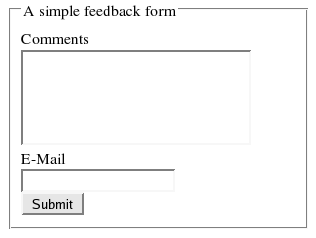
Before any coding, we will create the required form. NOTE: The following form is a visual demo only - it will not save your comments. That is because the current server does not support PHP.

A simple feedback form


The above form is create using the code...


<form name="feedback_form" id="feedback_form" method="POST" action="save_data.php">
<fieldset>
<legend>A simple feedback form</legend>

<div id="form_elements">
<label for="comment">Comments</label><br />
<textarea name="comment" id="comment" rows="5" cols="30"></textarea><br />

<label for="email">E-Mail</label><br />
<input name="email" id="email" type="text" /><br />

<input name="action" id="action" type="submit" value="Submit" />
</div>

</fieldset>
</form>

PHP Code that Updates the Table

Keep this in the 'save_data.php' - the file that is given as the action of the above form. This is the file that does the server side duties - like saving the user entered values to the database


<?php
include('./connect.php'); //Connect to the database.

//Insert data into our database
mysql_query("INSERT INTO feedback(feedback_email,feedback_comment,feedback_time) 
 VALUES('$_REQUEST[email]','$_REQUEST[comment]',NOW())") or die("Cannot save : " . mysql_error());

?>
<html>
<head>
<title>Feedback Received</title>
</head>
<body>
<h1>Feedback Received</h1>

Thank you for your intrest - we will look into your comment as soon as possible.
</body>
</html>

Our traditional feedback form is functional now. In the next section we will see how to add the 'Ajax Effect' to this page.

[This the second part of a three part series on Basic Ajax progamming. See part one - A Gentle Introduction to Ajax]
UPDATE : The third part of the Tutorial - Ajax Feedback Form is now available.

Read More...

jx Ajax Library - in Object Notation

I have been planning to rewrite the jx Ajax Library using object notation. I have been putting it off for some time now. But after reading Dustin's JSON article I could not wait any longer. So here it is...

////////////////////////////////// jx Library ///////////////////////////////////////////
var jx = {
 http : false, // We create the HTTP Object
 
 //Create a xmlHttpRequest object - this is the constructor. 
 getHTTPObject : function() {
  var xmlhttp;
  
  //Use IE's ActiveX items to load the file.
  if(typeof ActiveXObject != 'undefined') {
   try {
    xmlhttp = new ActiveXObject("Msxml2.XMLHTTP");
   } catch (e) {
    try {
     xmlhttp = new ActiveXObject("Microsoft.XMLHTTP");
    } catch (E) {
     xmlhttp = false;
    }
   }
  //If ActiveX is not available, use the XMLHttpRequest of Firefox/Mozilla etc. to load the document.
  } else if (XMLHttpRequest) {
   try {
    xmlhttp = new XMLHttpRequest();
   } catch (e) {
    xmlhttp = false;
   }
  } else {
   xmlhttp = false;
  }
  return xmlhttp;
 },

 //This function is called from the user's script. It will take a url and an optional callback function.
 // Then it will read the url file, expecting a json string. Once the file is loaded, the script
 // will phase the json string using 'eval' and call the user defined callback function with this
 // array as the argument.
 //Arguments - 
 // url - The url of the serverside script that is to be called. Append all the arguments to 
 //   this urls as GET params - like get_data.php?id=5&car=benz
 // callback - Name of the function that should be called once the data is ready. If a callback
 //   function is not given, then the default function 'jx_processResults' will be used.
 // type - The return type for this function. Could be 'json' or 'text'. If it is json, the string will be
 //   'eval'ed before returning it. Default:'text'
 getData : function (url,callback,type) {
  if(!this.http) return;
  if(!type) var type = "text"; //Default type is 'text'
 
  this.http.open("GET", url, true); 
 
  //Call a anonymous function when the state changes.
  this.http.onreadystatechange = function () {
   if (jx.http.readyState == 4) {//Ready State will be 4 when the document is loaded.
    var result = "";
    if(jx.http.responseText) result = jx.http.responseText
    
    //If the return type is json, we have to 'eval' the string before returning it.
    if(type == "json" || type == "j" || type == 1) {
     //Careful - if the responseText is not a valid json string, 
     //  there will be javascript errors here.
     result = eval(result); //Yes, I know I used eval - its JSON, stupid.
    }
    
    if(callback) {
     callback(result); //Give the data to the user defined function.
    } else { //If there is no user defined function...
     //Call a predefined  function with the result.
     if(jx_processResults) jx_processResults(result);
    }
   }
  }
  this.http.send(null);
 },

 init : function() {
  this.http = this.getHTTPObject();
 }
}

//Call it like this.
function init() {
 jx.init();
 jx.getData("data.php",function (data) {
  alert(data);
 },'t');
}
window.onload=init;

If you have any opinions about how to improve it, please feel free to use the comment area below. I major drawback of this system over the 'global function' approach is that this method needs to call the jx.init() at the beginning of the code. In the previous method, we could call the jx_getData function without any other code. If you have any suggestions on how it can be avoided, they are very welcome.

Read More...

A Gentle Introduction to Ajax

What is Ajax?

Ajax or Asynchronous JavaScript and XML enables the programmer to execute a server-side script without refreshing the page.

Example...

A simple form.

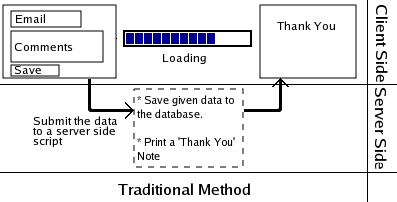
Traditional method

The user enters the comments and email and then clicks the submit button. The browser sends the entered data to the server-side script through the post or get method. When this is done, the browser will call the server-side script(for example a PHP page) by loading that page in the browser. This page will save the data to a database and display a 'Thank You' message in the browser.

The problem with this approch is that the users loses some time waiting for another page to load. The page cannot save the entered data without loading the PHP file.

The flow of data in the Traditional method

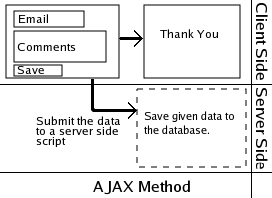
Ajax Method

Here when the user clicks the Submit button, a javascript function is called which loads the server-side script in the background. The user does not see it being loaded. Instead the JavaScript will immediatly remove the form from the page and show a 'Thank you' message dynamically - without reloading the page.

The flow of data in the Ajax method

Algorithm

if (user hits the submit button) {
 comment = (user submitted comment)
 email = (user's email id)
 
 //Happens in Background
 CallPage("save_comment.php?comment=" + comment + "&email=" + email);
 
 //User sees this...
 Remove(form)
 Display("Thank you for your comment.")
}

Application

The given example was for a simple application. In more advaced uses, the result generated by the called server-side script will be taken and used in the page. Some applications that would be impossible without Ajax are...

Examples of use of Ajax

Problems

  • Breaks the Back button
  • Works only on the latest browsers
  • Harder to make and maintain
  • Goes against user expectations
  • Assesibility issues

[This the first part of a three part series on Basic Ajax progamming]
UPDATE : Part 2 of tutorial is now available.
UPDATE : The third part of the Tutorial - Ajax Feedback Form is now available.

Read More...

jx Ajax Library Code (Beta Version)

Remember the Ajax Library I talked about in the last post? I am releasing the first version of its code. This is a beta version and the final one will be much different - but the underlying concept will be the same...

////////////////////////////////// ax Library ///////////////////////////////////////////
var jx_http = jx_getHTTPObject(); // We create the HTTP Object
//Create a xmlHttpRequest object - this is the constructor. 
function jx_getHTTPObject() {
 var xmlhttp;
 
 //Use IE's ActiveX items to load the file.
 if(typeof ActiveXObject != 'undefined') {
  try {
   xmlhttp = new ActiveXObject("Msxml2.XMLHTTP");
  } catch (e) {
   try {
    xmlhttp = new ActiveXObject("Microsoft.XMLHTTP");
   } catch (E) {
    xmlhttp = false;
   }
  }
 //If ActiveX is not available, use the XMLHttpRequest of Firefox/Mozilla etc. to load the document.
 } else if (XMLHttpRequest) {
  try {
   xmlhttp = new XMLHttpRequest();
  } catch (e) {
   xmlhttp = false;
  }
 } else {
  xmlhttp = false;
 }
 return xmlhttp;
}

//This function is called from the user's script. It will take a url and an optional callback function.
// Then it will read the url file, expecting a json string. Once the file is loaded, the script
// will phase the json string using 'eval' and call the user defined callback function with this
// array as the argument.
//Arguments - 
// url - The url of the serverside script that is to be called. Append all the arguments to 
//   this urls as GET params - like get_data.php?id=5&car=benz
// callback - Name of the function that should be called once the data is ready. If a callback
//   function is not given, then the default function 'jx_processResults' will be used.
// type - The return type for this function. Could be 'json' or 'text'. If it is json, the string will be
//   'eval'ed before returning it. Default:'text'
function jx_getData(url,callback,type) {
 if(!jx_http) return;
 if(!type) var type = "text"; //Default type is 'text'

 jx_http.open("GET", url, true); 

 //Call a anonymous function when the state changes.
 jx_http.onreadystatechange = function () {
  if (jx_http.readyState == 4) {//Ready State will be 4 when the document is loaded.
   var result;
   if(jx_http.responseText) result = jx_http.responseText
   else result = "";
   
   //If the return type is json, we have to 'eval' the string before returning it.
   if(type == "json" || type == "j" || type == 1) {
    //Careful - if the responseText is not a valid json string, there will be javascript errors here.
    result = eval(result); //Yes, I know I used eval - its JSON, stupid.
   }
   
   if(callback) {
    callback(result); //Give the data to the user defined function.
   } else { //If there is no user defined function...
    //Call a predefined  function with the result.
    if(jx_processResults) jx_processResults(result);
   }
  }
 }
 jx_http.send(null);
}

//This is the function that is called when the javascript fetches the given url. We can put our code
//  in it.
function jx_processResults(data) {
 return;
}

We can call this script using the code

//This is the function that is called when the javascript fetches the given url. We can put our code
//  in it.
function jx_processResults(data) {
 if(data) {
  alert("The user 'binnyva' exists in the database. Please choose another username.");
 } else {
  alert("The username 'binnyva' is free!");
 }
}
jx_getData("user_exists.php?login=binnyva");

...OR...

jx_getData("user_exists.php?login=binnyva",function(data) {
 if(data) {
  alert("The user 'binnyva' exists in the database. Please choose another username.");
 } else {
  alert("The username 'binnyva' is free!");
 }
});

... OR with JSON ...

function showUser(data) {
 alert("Username : " + data['username'] +
  "\nLocation : " + data['location'] +
  "\nWebsite : " + data['website'] +
  "\nEmail : " + data['email']);
}
jx_getData("user_details.php?login=binnyva",showUser,"json");

This is a preview release - the functions are not finalized yet. I will probably put a wrapper class around it - like this...

jx = {
 "http":this.getHTTPObject();

 "getHTTPObject": function() {
  /*...*/
 }
 
 //Rest of the functions.
 /*...*/
}

If you have any suggestions, this is the best time to let me know.

Read More...

Smallest Ajax Library - jx

I am trying to create the smallest Ajax library - I call it jx. Like many other javascript developers, I hate libraries. The primary reason for this is that they are big. When ever I get I library with a functionality I need, I try to extract just the needed function for my program.

So now I am trying to create a library with just one(or two) functions so that who ever is using it will find it easy to extract just the needed functions. But my final goal is to strip away every function that is not crucial - so that the library users won't have to do it.

I have one problem however. I was hoping that I could make it simple enough to do this...
var data = jx_callScript('script.php?arg=value');

But as of yet, I am finding it impossible to do. I need at least two functions - like this.

function callBack(data) {
 /*
 ...
 */
}
jx_callScript('script.php?arg=value',callBack);

This is because of jx_http.onreadystatechange = functionName; where 'onreadystatechange' must have a function attached to it. When the browser finishes fetching the data from the server, it will call the given function. But I want to get it as a return value.

If someone knows how to get over this obstacle(or even if it possible), please let me know.

Read More...

AHAH(Asynchronous HTML over HTTP) - AJAX 2.0

AHAH or Asynchronous HTML over HTTP is a much simpler version of AJAX. Using AHAH approach in JavaScript you can display external XHTML pages inside your HTML page. The beauty of the script is that it is so very simple - the underling code is just twenty lines!

The difference between AJAX and AHAH is about XML. AJAX will load an XML file - then the developer will have to make the code that will parse the XML, extract the data and then display the results. In AHAH the approach is much simpler - the data to be fetched is XHTML - the code just has to fetch it - as the browser is already equipped to handle HTML and will display the result with no further help from the developer.

For example, lets say we need to create a page with tabs - each tab will put some content in the main area - but the full thing must be dynamic - linking to another page won't do. The code of the main page will be...

<ul id="tabs">
 <li><a href="load('javascript.html');">JavaScript</a></li>
 <li><a href="load('ahah.html');">AHAH</a></li>
 <li><a href="load('ajax.html');">AJAX</a></li>
</ul>

<div id="content"></div>

The point of our exercise will be to load the contents of the javascript.html in to the div with the id 'content'. In the JavaScript section of the file we will declare the 'load' function...

<script language="javascript" type="text/javascript" src="ahah.js"></scirpt>
<script language="javascript" type="text/javascript">
//Calls the library function 'ahah' - defined in 'ahah.js' file.
function load(filename) {
 ahah(filename,"content");
}
</script>

The code of the ahah.js file as given below...

function ahah(url, target) {
  document.getElementById(target).innerHTML = ' Fetching data...';
  if (window.XMLHttpRequest) {
    req = new XMLHttpRequest();
  } else if (window.ActiveXObject) {
    req = new ActiveXObject("Microsoft.XMLHTTP");
  }
  if (req != undefined) {
    req.onreadystatechange = function() {ahahDone(url, target);};
    req.open("GET", url, true);
    req.send("");
  }
}  

function ahahDone(url, target) {
  if (req.readyState == 4) { // only if req is "loaded"
    if (req.status == 200) { // only if "OK"
      document.getElementById(target).innerHTML = req.responseText;
    } else {
      document.getElementById(target).innerHTML=" AHAH Error:\n"+ req.status + "\n" +req.statusText;
    }
  }
}

Now the only file left is the three content files - javascript.html, ahah.html and ajax.html. The important thing to remember about this is that you should not include the standard HTML stuff like <html><body> etc. in this page - just the content with all the HTML formatting - I am just providing the code for just the file javascript.html here - remember that this is the whole file - nothing other than the shown data must be in that file.

<h1>JavaScript</h1>

<p><b><u>JavaScript</u></b> is Netscape's cross-platform, object-based scripting 
language for client and server applications. It has dominated the world of internet scripting languages 
for a long time now. With the arrival of new programming methods like <a class="tooltip" 
title="AJAX : Asynchronous JavaScript and XML" href="http://en.wikipedia.com/wiki/AJAX">AJAX</a>, 
it is much more popular now than ever before.</p>

<p>See the wikipedia article on <a  href="http://en.wikipedia.com/wiki/JavaScript">JavaScript</a>
 for more info on this language.</p>

Use you imagination to create the other two files. Now open the page on a browser to see the magic. See the live example...

More Links

Filed Under...

Categories :
Technorati Tags:
Read More...

Subscribe to : Posts