Site Moved

This site has been moved to a new location - Bin-Blog. All new post will appear at the new location.

Bin-Blog

I have moved my Blog

Every commenter in the last post agreed with me. As a result, I am moving the blog from http://binnyva.blogspot.com/ to http://www.bin-co.com/blog/. From the next post onwards, the post will be duplicated here and in my Bin-Co site. At the end of this month, I will abandon this blog and focus on the new one.

Abandon does not mean that I will delete the blog or its contents - that will stay. I will stop posting here. I will still carry out some maintenance tasks like weeding out the spam, repling to comments etc. However, from next month, no more new content will appear here.

So the new blog URL is ...drum roll...

Bin-Blog

Take a look - no contents yet. But still, feel free to look around my Bin-Co site too.

Content Duplication

One of my tougher decision was not to import the contents of this blog into the new one. So, the contents in this blog will not be there in the new blog. One major reason is content duplication. I don't want to be penalized for duplicate content.

Feed

Please DO NOT update/change the feed URL. I am using FeedBurner - and I will change the source feed when the time is right. So, you don't have to change the feed URL.

Read More...

Should I move my Blog?

Lately, I am under a lot of pressure to move this blog to one of my own servers. I have thought about this before. I even have moved parts of it - like BinnyVA and OpenJS - but never moved the site entirely. Moving has its advantages and its disadvantages. Before I make the decision, I thought I will ask the site's readers for some feedback. So, what do you think guys? Should I move to my own domain?

Advantages of Moving

More Serious
A blog that has its own domain will be considered by many to be more serious than a blogspot site.
WordPress!
A self-hosted WordPress blog is a better blogging platform than Blogger
Control
WordPress gives the user a lot more control than blogger
Easier Commenting
I can take the captcha out of commenting - Akismet will protect me from spam - even though there is some problems - like false positives.
Google Juice Sharing
If I move, I plan to move my blog to http://www.bin-co.com/blog/.
So all the SEO advantage for the blog will be available for Bin-Co.com and all its SEO advantage will be available for the blog. A nice setup.

Disadvantages

SEO
I have many links pointing to this site - this includes one Digg Homepage appearance. I will lose all those advantages if I move away. This is the main reason I have not moved away yet.
Maintenance overhead
even though there is automatic installation and updating for WordPress in Dreamhost.
Server Capability
In the event of a Digging, a blogger site has more chance of staying alive than a smaller site. But I believe my hosting can take a beating before going down. But still, Dreamhost has its, how shall I put it..., issues.

What do YOU think?

I am forced to consider this move because many people have asked my why I am still on Blogger - despite having many sites of my own. Look at the comments on my last post - Benedict Herold has only one thing to say. Can't blame him - he already has made the move - from Blogger to WordPress. He even has a neat picture to explain which is the better platform.

Then there is Ajay. Says he won't comment on my site unless I move to wordpress. When ever I chat with him, he wants to know if I will move to wordpress ;-). So, Ajay, here is your chance to have your say - should I move or not. Comment on this post, OK? Even if you think it is a bit slow for you.

Think of this as a voting system. If enough people ask me to move, I will move. I am sure that many of my readers will have some thoughts regarding this as well.

So, what do you think? Should I make the move? Leave a comment. Do you have any experience to share about moving your blog? Let me know.

Read More...

I am NOT Spam!

When I was making the last post, I noticed something that was not there before - a word verification for posting. It was a rude shock for me - like a surcharge in a formerly surcharge free ATM. Turns out, the great Google bots think that this is a spam blog. Guys, this is not a spam blog! I have a spam blog - but this is not it.

Your blog requires word verification

Blogger's spam-prevention robots have detected that your blog has characteristics of a spam blog. (What's a spam blog?) Since you're an actual person reading this, your blog is probably not a spam blog. Automated spam detection is inherently fuzzy, and we sincerely apologize for this false positive.

Luckily there was an option to say that this blog is not spam. Needless to say, I used that option, and they sent out real humans to test my site. Before long, I was cleared of all wrong doings :-)

We received your unlock request on April 5, 2007. On behalf of the robots, we apologize for locking your non-spam blog. Please be patient while we take a look at your blog and verify that it is not spam.

All jokes aside, I appreciate the fact that the Blogger team is working hard to get rid of the spam blogs in blogger. Blogger is just infected with those. A side effect of this is that I cannot comment on other people's blog using my blog's address(http://binnyva.blogspot.com/) as the URL. Akismet thinks that since I use a blogger site, my comment must be spam.

Just a friendly reminder to the guys using Akismet Plugin - its great for blocking spam - I use it myself. But there is quite a few instance of false positives - ie. legitimate comments marked as spam. So make sure you check the spam folder often. False negatives I can stand - but not false positives. That's bad.

Read More...

Blogger Changed the Feed URL for Blogger Beta Sites

Blogger have changed the URL of the feeds of all the blogs that have upgraded to Blogger beta. In the previous version of blogger, the feeds were located in the location...

http://<blogger_id>.blogspot.com/atom.xml
(Eg. http://binnyva.blogspot.com/atom.xml )

Now it is in...

http://<blogger_id>.blogspot.com/feeds/posts/full
(Eg. http://binnyva.blogspot.com/feeds/posts/full )

This is a bad move by blogger. I just can't understand why they did it. They least they could do is redirect all traffic to the old location(http://binnyva.blogspot.com/atom.xml) to the new location(http://binnyva.blogspot.com/feeds/posts/full). By best bet is that they want to use REST architecture.

Another thing I don't understand is the result that is returned by the server when the feed URL is accessed. It returns the status 400 - Bad Request. Not 404(Page not found) but 400. I wish they would change this to 301(Moved Permanently) and redirect the user to the new feed location.

UPDATE : This problem is fixed now! Thanks Guys.

Syndication Errors

So why is this a bad thing? Why am I complaining when a page is moved. The answer is simple : Syndication. Many people who have subscribed to my feed using the old URL will not be able to access the feed. Many indexers like Technorati, Syndic8 etc. will not be able to access and index my blog. All because the URL for feed is changed.

Fortunately for me, I am using the Feedburner service. So I don't have a problem if the feed is moved. I just change the 'Original Feed' location in my feedburner account, and the the visitors will get the new data - without even noticing the change. If you are worried that Blogger will change the feed again, go register for this service(its free).

But I used the URL 'http://binnyva.blogspot.com/atom.xml' whenever I submitted my blog to an automatic indexer(Technorati,IceRocket,etc.). Now I will have to go around and update all those sites.

Bad move blogger. Hope you fix this issue soon.

New Features

That said, I have to admit the new feed system is cool. You can specify some quires and you will get a feed based on those quires.

For example, you can use the URL http://binnyva.blogspot.com/feeds/posts/full?max-results=5 and get the latest 5 posts instead of the default 25 new posts. Also there is a provision to get the feed for the comments of each post.(Eg. http://binnyva.blogspot.com/feeds/2591766938765279155/comments/full is the comments for the recent Fedora Core 5 - 64bit Vs 32bit post)

Some quires that work with the XML feed. There might be more, but these are the only ones I know. If you know any that are not included here, let me know and I will include them.

URL : http://binnyva.blogspot.com/feeds/posts/full

Parameters

max-results
The number of posts that should appear in the XML(Default : 25). Example : http://binnyva.blogspot.com/feeds/posts/full?max-results=5
start-index
The post from which the listing should be taken. 1 means latest, 2 means second latest and so on(Default : 1).

I think they are using an updated feed creator - the version given in the generator tag have changed. The new XML feed has Generator 'Blogger 7.00' while the older one has 'Blogger 6.72' as the generator.

RSS/Atom

Another thing I noticed was that the feed is available only in the atom format. In the previous version, they had both the Atom Format and the RSS format. Atom was available at http://binnyva.blogspot.com/atom.xml while RSS could be accessed at http://binnyva.blogspot.com/rss.xml . I can't find any way to get the RSS format in the new release(Blogger 7.0). Do any of you know where I can access the RSS format of the feed?

Filed Under...

Read More...

Blogger Beta

I have upgraded to Blogger Beta - now I can access many more features - like labels, WYSIWYG template modification etc. Since I use a customized blog design, it has not been easy. In fact, it was quite hard. But was it worth it? I don't know yet.

New templating Language

The templating language has been changed entirely. Many new features have been added - and the complexity have gone up greatly. I understood the language - but I don't think anyone without a programming background would spend enough time to study it.

Loops

The <b:loop ... > tag lets you repeat a section of content multiple times with little or no changes. Example...

<b:loop var='post' values='data:posts'>
   <h2><data:post.title/></h2>
</b:loop>

Conditional Statement - If/Else

Shows the content only if the given statement is true(or false). Example...

<b:if cond='data:blog.url == data:blog.homepageUrl'>
 <data:title/>
<b:else/>
 <a expr:href='data:blog.homepageUrl'><data:title/></a>
</b:if>

Section - Widget - Include

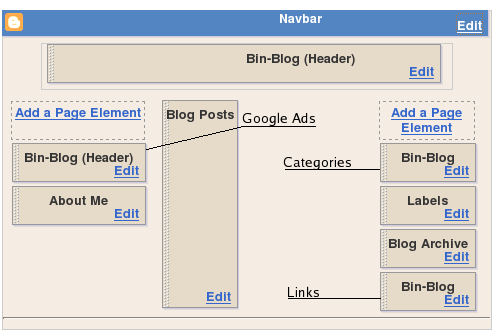
The Section/Widget/Include system make the Drag and Drop template editing system possible. The section is a top level container which can contain multiple widgets. A widget can have many 'includable's. The includable with the id 'main' will be shown by default. You can display the other includable using the code '<b:include name='ID_OF_INCLUDABLE'/> Some sample code - this code shows the header of this blog...

<b:section class='header' id='header' maxwidgets='1' showaddelement='no'>
<b:widget id='Header1' locked='true' title='Bin-Blog (Header)' type='Header'>
<b:includable id='main'>
<h1 id="blog-title">
<b:if cond='data:blog.url == data:blog.homepageUrl'>
<data:title/>
<b:else/>
<a expr:href='data:blog.homepageUrl'><data:title/></a>
</b:if>
</h1>
<p id="description"><data:description/></p>
</b:includable>
</b:widget>
</b:section>

Very powerful - but complicated.

In Conclusion

I like the new templating system - it is complicated, but very powerful. If you are willing to spend the time to study it, you can make magic. Kudos to the Blogger team for bringing it out.

If you notice any problem this blog, let me know. I not have tested this in IE yet - I have linux remember?

Did you move your blog to blogger beta? Why not? If you did, how did it go? Leave some comments.

References

Filed Under...

Read More...

Blogger Compresses the Uploaded Images - with bad results

I am very mad at Blogger right now. I went through a lot of trouble creating the images for the last few posts. I worked with GIMP for quite some time to create some effects for the images of Perl and XML. I am not very good with graphics, so I had to spend more time than necessary to do this. Finally I upload the images to Blog and what do I find? Blogger compresses my beautiful PNG images to create some ugly JPEG files. You can see the results yourself.

Original ImageBlogger Compressed Image
XML Logo With Compression.
Perl Logo Perl Logo - but with compression.

I am not saying that I blame them for doing it. There are people who don't know the first thing about image compression - they just shoot a picture and upload it to their blog. The files may be very large - so blogger has to do the work for them. I know that this is necessary - but at least warn the rest that the images will be compressed. Just a few lines in the uploading section will do.

On a side note, this blog is now one year old. Its birthday came and went unannounced. It is traditional to provide a post on the best posts of that year - but since I recently created a post 'The Best Posts of 2005' for the new year, I decided not to bore you with another one.

Filed Under...

Read More...

Moving the Blog from Blogspot

Now that I have broken my dependence on GeoCities, I think I am going to do the same with Blogger. I have been using Blogger to host my blog for almost a year - and I am very happy with their service. But I think it is time to go professional - build a Blog on my own domain - using a software that I could customize to fit my own needs. It will take some time but I think will do it.

Jakob Nielsen, the usability guru have given a list of mistakes you can make in blogging(something I blogged about before) and the last one is about having a Domain Name Owned by a Weblog Service.

Having a weblog address ending in blogspot.com, typepad.com, etc. will soon be the equivalent of having an @aol.com email address or a Geocities website: the mark of a naive beginner who shouldn't be taken too seriously.

I am not very sure that having a 'blogspot.com' address will automatically demote one's site in others eyes - I have seen many great blogs on free services, but I am a web developer and I will be disregarded if I am using a free service to create my site. These blogging platforms provide the lowest entry point to web publishing - I will not come out good if I continue using this service - now that I have an option to use my own site to do the blogging.

But the main reason I am switching is because of JavaScript. Blogger will not allow me to insert JavaScript code into the post - this prevents me from making a demo of even the simplest scripts on the page. I have to depend on an external site if I wish to create a demo page.

Also if I use a professional option, I get to use WordPress - I really wanted to learn this blogging platform. Another alternative is to stick with Blogger - but use their FTP option to upload the posts directly to my site. But this option will not solve the JavaScript problem described earlier.

What do you think of my decision - good or stupid? Did any of you experience a similar situation? If yes, how did you solve it?

Read More...

Multiple Months for Calendar Navigation

I have added a new feature to the blog today - now you can use the calendar navigation to access posts from previous months. This is the second version of the Calendar Navigation for Blogger program in javascript.

Now the calender will have a link for the last three months. All the posts of the last three months will be shown in the calendar. All the links to the post has the 'title' attribute so if you hover on a link for a second you will see the title of the post - so you will not be blind in choosing which posts you want to read.

I still have no idea why I am working on the calendar navigation - Jakob Nielsen, the foremost web usability expert have condemned calendar navigation to be a very useless form of navigation. Anyway, since I have made it, why not make it better?

One last thing - the new version is still in beta - if you notice any errors, just let me know using the comment system. If you have any suggestions about how to improve it or any other opinion about this system, well, you know what to do.

Filed Under...

Categories :
Technorati Tags:
Read More...

'Links to this post' Option for Blogger

Google Blog has an intresting new feature - 'Links to this post' - Blogger has activated this feature for all its sites. This will show all the links from everywhere to that particualar post. This is not the ping or trackback feature that Wordpress or Moveable Type or other such blogging softwares - this system will search the web in real time for all the links to that particual post - kinda like what technorati does. I should have seen this comming when google decided to create a Blog Search

The template of Google Blog was updated - even the first post have the 'Links to this Post' option. Now the big question - do I use this option in my blog? Maybe - I am not sure - I have to wait for others to try it out first before trying it out myself. Why be the gunie pig when you can get others to do it for you? But if it works out fine, the trackback feature of other major blogging platforms like Moveable Type and WordPress will be obselete.

Filed Under
Categories :
Technorati Tags:
Read More...

Calendar Navigation System for Blogger

Serious bloggers will tell you that calendar navigation is pretty useless as a form of navigation. But I still wanted to have that option available to me. And since blogger did not have it, I decided to create one myself.

The result of the system is shown at the top right corner of this blog - not a great script, but serves it perpose well. I created this script - not as a navigation aid but as a way of forcing myself to write more blog entries. This calender only shows the blog of the current month - and no one would like to see a post free month - especally not me. It is my firm belief that this visual aid would force me to increase my post freqency. If not atleast it is a 'customisable visual navigation aid'.

As always the script is open and under the BSD license - you are free to edit it, use it, give it to others and so on. I would be extreamly grateful if you link to my site from your page - but that is an option - not a rule.

The code is given below - copy it and save it to a file.


/*************************************************************************
Script  : Post Calendar
Version : 1.00.A Beta
Author  : Binny V A
E-Mail  : binnyva (at.) hotmail (dot.) com
Website : http://www.geocities.com/binnyva/code/javascript/post_calendar/
Description:
This will implement a calendar navigation for your blogs. The
     blogs made with WordPress, LiveJournal, MoveableType etc
     already has this feature - but not the Blogger. So I made
     this script to be used with Blogger.
****************************************************************************/

//Globals
var  month_names = new Array("January","February","March","April","May","June","July","Augest","September","October","November","December");
var month_days  = new Array(31,28,31,30,31,30,31,31,30,31,30,31);
var marked_days = new Array();
var data = "";
var post_index = 0;

//Get today's date - year, month, day and date
var today = new Date();
var year = today.getYear();
year = (year > 2000) ? year : year + 1900;
var date = today.getDate();
var month = today.getMonth();
var day = today.getDay();

//date_string must be in the format of - YYYY-MM-DD or just the date.
function addPost(date_string,link,desc) {
  if(isNaN(date_string)) {
      var day_parts = date_string.split(/\b/);
  } else { //If only the date_string is given, it is valid
      var day_parts = new Array(year,"",(month+1),"",date_string);
  }
  if(day_parts[0] == year && day_parts[2] == (month+1)) {    //Make sure that only the posts of this month will get in -
      marked_days[post_index] = new Post(day_parts[4],link,desc);
      post_index++;
  }
}

//Class
function Post(day,link,desc) {
  this.day = Number(day);
  this.text = "<a class='post-link' href='"+link+"' title='"+desc+"'>"+Number(day)+"</a>";
}

//Functions
function wrt(txt) {
  data += txt;
}

function makeCalendar() {
//Display the table
wrt("<table class='calendar-nav'>");
wrt("<tr><th colspan='7'>"+month_names[month]+" "+year+"</th></tr>");
wrt("<tr class='header'><td>Sun</td><td>Mon</td><td>Tue</td><td>Wed</td><td>Thu</td><td>Fri</td><td>Sat</td></tr>");

//Get the first day of this month
var first_day = today;
first_day.setDate(1);
var start_day = first_day.getDay();

var d = 1;
var flag = 0;
var w = "";
//Create the calender
for(var i=0;i<=5;i++) {
  wrt("<tr>");
  for(var j=0;j<7;j++) {
      if(d > month_days[month]) flag=0;//If the days has overshooted the number of days in this month, stop writing
      else if(j>=start_day &&amp;amp; !flag) flag=1;//If the first day of this month has come, start the date writing

      wrt("<td class='days'>");
      if(flag) {
          w = d;

          //See if there is any posts on that day
          for(var k=0;k<marked_days.length;k++) {
              if(marked_days[k].day == d) { //There is a post
                  w = marked_days[k].text;
              }
          }
       
          wrt(w);
          d++;
      }
      wrt("</td>");
   
  }
  wrt("</tr>");
}
wrt("</table>");

document.getElementById("calendar-navigation").innerHTML = data;
}
window.onload = makeCalendar;

//All posts
//Add your posts data here - in the format
//addPost("YYYY-MM-DD","LINK_TO_THE_POST","POST_TITLE");
addPost("2005-08-09","http://binnyva.blogspot.com/","And now in Firefox - XML parsing.");
addPost("2005-08-10","http://binnyva.blogspot.com/","Bus Strike in Kerala");
addPost("2005-08-13","http://binnyva.blogspot.com/","Finished 'The DaVinci Code'");

Then upload your script to any site - I hope that you got a site to which you can upload this script - if not, I am extreamly sorry - it basically kills the idea.

Then add this line to your blog template in the <head> section.

<script language="javascript" type="text/javascript" src="http://URL-TO-THE-SCRIPT.js"></script>
Then add the below line in the template where you want the calendar to appear.
<div id="calendar-navigation"></div>
The appearence can be altered using the CSS section in your template.

Now here is the hard part. When ever you make a new post, you must one line at the end of the external Javascript file - like this...

addPost("2005-08-23","http://binnyva.blogspot.com/","Calendar Navigation System for Blogger");

I am sorry that it is not a very user friendly to install - I created this for my own use. If a lot of people want to use it, I could make a small system to automate the post adding and script hosting.

Some points before I leave...

This script if for people who know JavaScript - if you don't know javascript, it would be better to give it a pass for now. Another thing is that the script is in Beta - so expect bugs if you are going to use it. The last thing is that this script will show only the post of this month - so only the most recent posts will be shown.

Hope you like it.

UPDATE: I have removed the calender when I redesigned this site. So, in this post, I have included a sample of how it will appear...

Read More...

Subscribe to : Posts