Site Moved

This site has been moved to a new location - Bin-Blog. All new post will appear at the new location.

Bin-Blog

Top 5 Features Missing in Google Reader

Google Reader Logo

I am using Google Reader as my RSS Aggregator. After using this for some time, I am still unsure of how to do some things. I don't even know weather its possible or not. And since Google Reader is publishing usage stats, I know that 35% of my readers uses Google Reader - so I want to ask these doubts to you.

1. Can I search through my subscribed feeds?

There are many times when I wanted to find an old post I have read. Is there any way to search through my subscribed posts? Its ironic that Google fails to provide this option.

2. Can I nest folders?

Can I put a folder inside another folder? I know that this is a tagging generation and hierarchical structures are outdated - that's how I like it.

3. How do I change a URL of a feed?

Some sites change the feed URL. It is a bad thing - but it happens. My question is how do I update the URL of a subscribed feed using Google Reader. The last time I had to do this, I had to delete the feed in question and subscribe to it again.

4. Is there a more efficient way to subscribe a feed from Firefox?

Is there any way I can click the subscribe button in Firefox - and get the feed subscribed without any additional clicks? I had outlined one method to make the handling of feed subscription better in Firefox. But that still requires one additional click. I know Google Reader provides a bookmarklet for this - but is it possible to subscribe using the Firefox's default way? Plus, even after clicking bookmarklet you should click the subscribe button.

5. Can I put the tags in one folder?

I like to use a lot of tags to mark a post - but I hate the fact that each new tag makes a new entry in the left side 'Subscriptions' column. I want that column small and manageable.

If any of these are not possible, I am sure that Google Reader engineers will find this post. Maybe they will add these features. So, if you are from google, please implement these features in Google Reader. Oh, and, leave a comment.

Read More...

Subscribing a feed in Google Reader using Firefox

The latest version of firefox has a feed preview feature. But subscribing a new feed in Google Reader using this feature leaves a little to be expected. If you use this feature to subscribe to feeds in the Google Reader, you must have come across the "Subscribe to Google Reader/Google Homepage" dilemma. I always want to subscribe to Google Reader - thats one extra click for me. But I found a way to overcome this.

Open a new tab and type in about:config in the address bar.

Type browser.contentHandlers in the Filter text box

Find the key name of the Google Reader property - in my system, it is 'browser.contentHandlers.types.2.title'. See image for clarification

The 'index' of the Google Reader, in my case is 2.

Right click on browser.contentHandlers.types.2.uri(the number must be the index of Google Reader in your system) and click Modify.

Enter the value...

http://www.google.com/reader/view/feed/%s

Now restart Firefox and try to subscribe to a feed - you will be taken to the google reader page directly. Then click on the "Subscribe" button on the top right corner to subscribe.

Read More...

Refferer Links in Google Analytics

Google Analytics is a great tool for tracking your visitors - I use it for all my sites. But there is one problem - you cannot find the exact URL from which the visitor has come(the 'Refferer' URL). Well, they provide this data - but have hidden it in the menu.

To get this list, open this menu in the left side of the Analytics page...
Marketing Optimization > Marketing Campaign Results > Referral Conversion.

Now just open a site to see the incoming links from that site.

I have no idea why they have decided to hide this feature - I use this feature a lot.

Read More...

Custom Search Engine from Google

You may have heard about the customized google search feature they just launched. I have decided to give it a try. I used it to create a search for all my sites - that is for these sites...

See it in action

According to Google...

Google Custom Search Engines empower users to choose which pages they want to include in their index, how the content should be prioritized, whether others can contribute to their index, and what the search results page will look like. With this launch, we're extending the power of Google search beyond Google.com.

Learn more - Custom Search Engine FAQ

Search My Sites

More Info...

Filed Under...

Read More...

Google AdSense showing Error

I just tried to access my AdSense account - but had a rude shock when I found an error message instead of the usual login page. And a very cool error message at that - the message...

The Google AdSense website is temporarily unavailable. Please try back later.
We apologize for any inconvenience.

... in 25 different languages.

I tired to access https://www.google.com/adsense/?hl=en_US&sourceid=aso&subid=us-et-ads when I got the error. The URL of the page is given as http://www.google.com/errors/asfe/system_down.html.

Google having trouble? Hope they fix it soon - there is a limit to the time I can endure being away from my AdSense stats. I am having withdrawal symptoms already!

Filed Under...

Read More...

Google Pages - Free Web Hosting Service from Google

Google Pages is yet another new feature from Google. This is basically a much more user friendly version of Geocities or Tripod. Google Pages allows you to host your pages on the web free of charge.

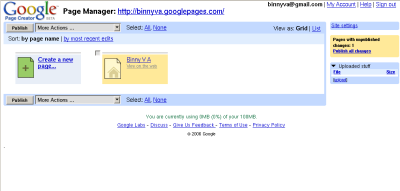
Screenshot of Google pages

I have already tried out the service. The editing is in WYSIWYG mode by default - and it looks quite nice. The web interface is almost as good as some WYSIWYG programs. For all you advanced users out there, there is also an option to edit the HTML of the site. It also have a 'Upload Stuff' feature that can be used to, eh..., upload stuff. I have not yet tried out all the features but I will try it as soon as I get some free time.

Be warned though - the site is in Beta - so expect many errors. I encountered some of these when I tried it out. Don't trust it with important data - there is a chance for data loss. Just make sure you have a backuped version on you local system and you should be fine.

Sreekanth, a colleague of mine have been playing around on this service much longer than me - he have already created a site that would pass of for a real site. Try it out - if you have a Gmail Id, you are already registered for the service.

Read More...

1000% Increase in Googe AdSense Clicks

No it is not a typo - 1000% increase in Googe AdSense clicks - I did not mean 100%, I meant 1000% increase. I was averaging at around, say, X clicks per day - that is till 12th of this month. Suddenly the number of clicks jumbed to 3X - and the next day to 7X. Next day it was 10.5X. The last time I checked it was 10X. (Sorry about the X thing - but Google won't let me print the exact numbers - atleast I think that they will not let me - who can understand EULAs?) By now you will be wondering what I did and would be itching to try the trick on your own site. I did very little - just changed the location of an ad in one page.

My Online Sudoku page was reciving around 600 page impressions per day - and it was giving me a fair amount of clicks. But then I noticed that left area of that page was wasted - only white space there. So I changed the location of the AdSense Ads to that space instead of the default right side of the page as in other pages. As a result, the amount of AdSense clicks on the page skyrocketed. And this is just from one page - I can't wait to see what will happen when I implement this on other pages.

If you are a AdSense publisher, try out this experiment. Choose a page that recives a good amount of page impressions per day - somewhere above 100. Now create a custom url based channel for that page in AdSense report section(If you don't know how to make a channel, see AdSense Support about this topic). Then change the Ad layout, position and color of the ads. Use one layout for one full day. Then use another for the next day. You will find that some layout will pay much more than others. You will have to experiment to find which one is the best for you. There is no 'one-size-fits-all' formula for this. When you find that 'perfect' ad placement, try it out on the other pages. Before long you will be earing much more than before.

For more information about which placements might be the best, check out the heat map provided by google. Also see this report entitled What We Saw When We Looked Through Their Eyes.

There is no way to say with authority which colours are the best once. Some people say that they get better results when they make the ads stand out of the page. Other say that results are better when they blend the ads with the colours of the page. The only solution to this problem is to experiment on your site by changeing colors of the ads till a clear winner emerges.

If you are a web site owner but not a Google AdSense publisher - what in the world are you waiting for? Get Google AdSense in your site - it won't cost you a thing(yes, you heard me - joining you for the program is free). And if you pay a little attension to your site, it will pay you a lot.

If you have tried the experiment, please use the comment section and let me know which method(s) worked for you. Or if you have some tips that were not said here(there are lots of them), share it with us.

Filed Under Categories : Technorati Tags:
Read More...

Google Analytics

Google just released a new product - Google Analytics. It is not a new product per se - AdWords publishers had access to this tool earlier - but now it is released to the common public. This is a site that will analyze traffic to a site and display it to the user in a graphical and friendly way.

I have used many traffic logging sites in the past for my website Bin-Co. This softwares include StatCounter, eXtream Tracker, SiteMeter etc. But being free softwares, they had their restrictions - for example, StatCounter will log the details of only the last ten visitors. eXtream Tracker don't log nearly as much information about the visitors as StatCounter does. They all have their own benefits and their own disadvantages.

Now that Google have stepped into the field, things will start to change. The only restriction I have heard about their software is that they allow only sites will less than five million hits per month - and that is still a long way for my site.

You have to register an account with Google to use this service - any Google account will do - gmail, Google sitemaps, Google group etc. accounts will do fine. Next you have to define your site - it is a little tricky here - only top level domains will be accepted - I can't enter my site http://www.geocities.com/binnyva/ - but had no problems when entering my Blog at http://binnyva.blogspot.com. Next you will have to enter a few personal details like name, etc. Then you will be given a small javascript snippet that you will have to enter into your site. After this you can see your website stats at the Google site. I have just entered the code to my Blogger template - I can't wait to try this out. Hope you will feel the same.

But even now the best way to analyse your traffic is referral logs created by your server. Lets see if Google can beat that with its latest offering.

Related Links...
Google Analytics Features
News of release
Other's Perspective
Slashdot Discussion of this feature.

Filed Under...
Categories :
Technorati Tags:
Read More...

'Links to this post' Option for Blogger

Google Blog has an intresting new feature - 'Links to this post' - Blogger has activated this feature for all its sites. This will show all the links from everywhere to that particualar post. This is not the ping or trackback feature that Wordpress or Moveable Type or other such blogging softwares - this system will search the web in real time for all the links to that particual post - kinda like what technorati does. I should have seen this comming when google decided to create a Blog Search

The template of Google Blog was updated - even the first post have the 'Links to this Post' option. Now the big question - do I use this option in my blog? Maybe - I am not sure - I have to wait for others to try it out first before trying it out myself. Why be the gunie pig when you can get others to do it for you? But if it works out fine, the trackback feature of other major blogging platforms like Moveable Type and WordPress will be obselete.

Filed Under
Categories :
Technorati Tags:
Read More...

First AdSense Check

A very happy day for me - I just got my first AdSense check. I was waiting for this day from the last year. When I joined the AdSense program - in November 2004, I did not even think that I would get any money for at least 3 to 5 years.

After 2 months, I calculated that I would get my check after 2 years. After another two months, I estimated that I will reach 100$ after 5 months. Another 2 months(right now) I am guessing that I could reach the 100$ milestone in about 4 months.

I have a geocities website - this kind of numbers of a geocities site is good. I am going to purchase a Domain and some web space in a few days time. And after that, the number of months to reach 100$ will reduce even more - there is very a good chance that I will get a 100$ every month after five months. *Sign* I love AdSense.

For those not acquainted with AdSense...

According to google's AdSense support docs,

Google AdSense is a fast and easy way for website publishers of all sizes to display relevant, unobtrusive Google ads on their website's content pages and earn money. Because the ads are related to what your users are looking for on your site, you'll finally have a way to both monetize and enhance your content pages.
More about AdSense

It basically means that if you have a website, you can get money by putting google's ads on the site. Want to see an example? Look to the right - there is a column there with the title "Ads by Goooogle". That is a Ad Unit. It will display 4 different ads based on the contents of this page. If a visitor clicks on any add, the advertiser will pay google a small amount of money(this will vary from 5 cents to about 1.5 dollars) - which google will pass on to me. When I get 100$ in my AdSense account, Google will mail me a check for that amount. A good introduction to AdSense can be found here.

If you are a web publisher, and have a decent number of hits(around 50 unique hits per day will do fine), and want to monetize your site, I would strongly recommend AdSense. Just try it - you have nothing to loose - the sign up is free - you don't have to spent a single penny to get into the program.

PS : I really hope that I have not gone against AdSense ToA by posting this information.

Read More...

SiteMaps - A New Technology from Google

http://googleblog.blogspot.com/2005/06/webmaster-friendly.html

Google came up with something new(nothing new about that, is there?) - a method in which webmasters tell the search engines which all files must be indexed, where it can be found, and how important it is. Till date, search engines index a site by scanning the html files for links to other files. Upon finding one, it adds this link to its list and scans it next. The problems with this approach are many...

  • Indexes many files that may be private. This is exploited by hackers in a process called google hack. If the webmaster did not include this file in the robots.txt exclusion list, it will be indexed by google bot. And if the webmaster includes the private file's URL in the robots.txt file, it will be an invitation for the hackers - as it will tell them exactly where they can find the private files.
  • Can be wrong in estimating the importance of a page. For example, I would consider my JavaScript Tutorial page to be more important than my CGI-Perl Tutorial page - but a bot may not be able to guess that.
  • Orphan files won't be listed - If a page don't have any other pages linking to it, it will not be listed.
  • And much more...

The new method will let the webmaster submit the location of a XML file that will have the location of all the pages in his website.

The format of the XML file is fairly simple.

<?xml version="1.0" encoding="UTF-8"?>
<urlset
xmlns="http://www.google.com/schemas/sitemap/0.84"
xmlns:xsi="http://www.w3.org/2001/XMLSchema-instance"
xsi:schemaLocation="http://www.google.com/schemas/sitemap/0.84
                    http://www.google.com/schemas/sitemap/0.84/sitemap.xsd">

<url>
<loc>http://www.geocities.com/binnyva/code/javascript</loc>
<lastmod>2004-06-08T09:28:34Z</lastmod>
<priority>0.8</priority>
</url>
<url>
<loc>http://www.geocities.com/binnyva/code/javascript/basic_tutorial</loc>
<lastmod>2005-01-01T15:49:32Z</lastmod>
<priority>1.0</priority>
</url>
<url>
<loc>http://www.geocities.com/binnyva/code/javascript/basic_tutorial/contents.html</loc>
<lastmod>2005-04-03T18:14:20Z</lastmod>
<priority>0.6</priority>
</url>

...

</urlset>

Lets have a look at one block.

 <url>
<loc>http://www.geocities.com/binnyva/code/javascript</loc> - The location of the page(URL)
<lastmod>2004-06-08T09:28:34Z</lastmod> - The 'Last Modified' date of that file.
<priority>0.8</priority> - The importance of the page - this can be anywhere between 0.0 and 1.0.
</url>

For more details, go to Google's page on GSM protocol

But you don't have to worry about making a XML file with the list of all your pages - good ol' google has provided a Python script that will do the job for you. This script(called Sitemap Generator) can be downloaded from its SourceForge page at http://sourceforge.net/project/showfiles.php?group_id=137793&package_id=153422

Basic Info...

Name: sitemap_gen
Version: 1.0
Summary: Sitemap Generator
Home-page: http://sourceforge.net/projects/goog-sitemap_gen/
Author: Google Inc.
Author-email: opensource@google.com
License: BSD

From the README file...

The sitemap_gen.py script analyzes your web server and generates one or more
Sitemap files.  These files are XML listings of content you make available on
your web server.  The files can be directly submitted to search engines as
hints for the search engine web crawlers as they index your web site.  This
can result in better coverage of your web content in search engine indices,
and less of your bandwidth spent doing it.

The sitemap_gen.py script is written in Python 2.2 and released to the open
source community for continuous improvements under the BSD 2.0 new license,
which can be found at:

http://www.opensource.org/licenses/bsd-license.php

The original release notes for the script, including a walk-through for
webmasters on how to use it, can be found at the following site:

http://www.google.com/webmasters/sitemaps/docs/en/sitemap-generator.html

How to use the script.

First, you have to create a configuration XML file that has the details of your site. Just copy 'example_config.xml' file that comes with the sitemap_gen script and edit it. The file has enough explanations so it should be easy enough to create a config file that will match your site. The config file that I used for one of my sites are given below...

<?xml version="1.0" encoding="UTF-8"?>
<!--
sitemap_gen.py configuration script - Bin-Co
-->

<site
base_url="http://www.geocities.com/binnyva/code/"
store_into="D:/code/sitemap.xml"
verbose="1"
suppress_search_engine_notify="1"
>

<directory  path="D:/code"    url="http://www.geocities.com/binnyva/code/" />


<!-- Exclude URLs that point to UNIX-style hidden files               -->
<filter  action="drop"  type="regexp"    pattern="/\.[^/]*$"    />

<!-- Exclude URLs that end with a '~'   (IE: emacs backup files)      -->
<filter  action="drop"  type="wildcard"  pattern="*~"           />

<!-- Exclude URLs that point to default index.html files.
  URLs for directories get included, so these files are redundant. -->
<filter  action="drop"  type="wildcard"  pattern="*index.htm*"  />

<!-- Custom Drops -->
<!-- Downloads -->
<filter  action="drop"  type="wildcard"  pattern="*.zip"  />
<filter  action="drop"  type="wildcard"  pattern="*.gz"  />
<filter  action="drop"  type="wildcard"  pattern="*.bz"  />
<filter  action="drop"  type="wildcard"  pattern="*.exe"  />

<!-- Images -->
<filter  action="drop"  type="wildcard"  pattern="*.gif"  />
<filter  action="drop"  type="wildcard"  pattern="*.jpg"  />
<filter  action="drop"  type="wildcard"  pattern="*.png"  />

<!-- Code Files -->
<filter  action="drop"  type="wildcard"  pattern="*.tcl"  />
<filter  action="drop"  type="wildcard"  pattern="*.pl"  />
<filter  action="drop"  type="wildcard"  pattern="*.cgi"  />

<!-- Script files  -->
<filter  action="drop"  type="wildcard"  pattern="*.js"  />
<filter  action="drop"  type="wildcard"  pattern="*.css"  />

<!-- Some Folders must not get in. -->
<filter  action="drop"  type="wildcard"  pattern="*Temp*"  />
<filter  action="drop"  type="wildcard"  pattern="*cgi-bin*"  />

</site>

The sitemap_gen.py script is actually meant to be run from your webserver - but that is not the way I did it. I ran the script on my local machine and then upload the XML files created to my server. Just make sure that the locations you gave in the config file correctly points to your pages. Now run the sitemap_gen.py script using python. I used this command.

python sitemap_gen.py --config=binco.xml

Just type this command in the terminal - you do have python installed don't you?

If everything goes well, a message will be shown which in my case was...

Reading configuration file: binco.xml
Walking DIRECTORY "D:/code\"
Sorting and normalizing collected URLs.
Writing Sitemap file "D:\code\sitemap.xml" with 183 URLs
Search engine notification is suppressed.
Count of file extensions on URLs:
    45  (no extension)
   123  .html
    12  .txt
     3  .xml
Number of errors: 0
Number of warnings: 0

Have a look at the sitemap.xml file that was created. All the pages of your site in one file. Now we have to submit this file to google. Before doing that, upload the XML file to your server and note its location. Then, login to to the google sitemap site at Webmasters using your gmail account. If you don't have one, create it now. Then click on the 'Add a Sitemap' link and input the location of the XML file we just created in the input field. This will add the XML file to the list of sitemaps that must be downloaded and parsed by google - this will take some time so be patient.

Thats all there is to it. The whole process can be automated - this is how google what it to be. Just upload the Python script and its config files to your server and set a Cron job to run every week. Make sure than the config file do NOT have the ' suppress_search_engine_notify="1" ' option. Now when ever the script runs, it will create the XML file and notify google that a new Sitemap was made.

This is another good idea by google. But even they are not confident this will work. The following text is taken from Google Blog.

'We're undertaking an experiment called Google Sitemaps that will either fail miserably, or succeed beyond our wildest dreams.'

Everything that could be used to improve the position of a site in google search will be abused by some webmasters. And this technology gives a lot of control to webmasters - so undoubtedly they will find a way to cheat using Sitemap. Till then, let us enjoy this technology.

Filed Under...

Read More...

Subscribe to : Posts