Site Moved

This site has been moved to a new location - Bin-Blog. All new post will appear at the new location.

Bin-Blog

Use of 'Numbers Particle' System in Programming

All numbers can be created using the series 1, 2, 4, 8, 16, 32, 64, 128, ... without repetition. For example, 7 can be represented as 1+2+4. 13 is 8+4+1. This property is used for creating binary number...


Decimal Numbers 12345678
Binary Numbers 00010010001101000101011001111000
Powers of 2 2021-22---23
Number Particles * 121+241+42+41+2+48

* For the lack of a better name. If you are aware of the correct terminology for this system, please let me know

An advantage of this series is that there is only one way to represent a number - ie. 7 can only be 1+2+4. In the normal series(1,2,3,4,5,6,7,8,...), 7 can be represented as 3+4, 5+2, 1+6, 1+2+4, etc. This property of the doubling number series can be used to store multiple values using just one number.

Example Usage

The best example for a use of this is the Linux File Permission system. In Linux...

  • 1 = Execute Permission
  • 2 = Write Permission
  • 4 = Read Permission

So if you want to give a file Read and Write permission it is 2 + 4 = 6. If you want Read and Execute permission it is 1 + 4 = 5.

Implementation

You can use this principle while designing a database. You can use this to store data that would otherwise require a reference table or multiple fields. For example, let us try to implement the linux user permissions system shown above using a database.

id1INT
filenameHello World.txtVARCHAR
is_writable1ENUM('1','0')
is_readable1ENUM('1','0')
is_executable0ENUM('1','0')

Actually, in linux, different permissions can be set for the file owner, the file owners group and the rest of the world. But I am ignoring that for simplecity.

In the above example, we use 3 fields for permissions. Using the 'number particle' method, we can reduce it to just one field.

id1INT
filenameHello World.txtVARCHAR
permission4INT

This method should not be used for a large dataset. Here the dataset is is write/read/execute - just 3. But if it is a larger dataset - like read/append/delete/modify/create/rename/copy/.... then using this system may not be the best method - as it will make the system more complicated. Even in small datasets, using this system will make things complicated. In most systems, I will not recommend using this method.

Another problem with this method is that the data is not atomic. So if you use this method, database normalization goes out the window.

Code

To use this method, you will need a method to decompose a number to its number particles. I have created such a function. Just give the number you want to decompose and it will return an array with the particles of the given number.

This code is in PHP - but feel free to translate it into other languages. If you have translated this into another languages, please leave the code as a comment.

function findParticles($number) {
 $all_particles = array();
 $series = 1;
 while($number) {
  if($number % 2) $all_particles[] = $series;//If the number is odd
  $number = intVal($number / 2);
  $series = $series * 2;
 }
 return $all_particles;
}

//Demo
$particles = findParticles(21); // Returns Array(1,4,16)

This is distributed under the terms of the BSD License.

Filed Under...

Read More...

Nexty Beta Released

Nexty is a easy to use To-Do list manager created in PHP. This tool adds a few of my concepts with the generally held concepts of GTD. It can be installed in a local server or in a online web server.

See Demo

This software is in beta stage - so expect some breakages here and there. I will try to release a stable version by the end of this week - by 10th February 2007 - but no promises.

Get the code from the project page of nexty at Sourceforge.
Read More...

Enabling Image Uploading in FCKEditor for PHP

FCKEditor is one of the most feature rich web based WYSWYG editors. I use it for almost all my projects. However, if you wish to enable image uploading in it, you have to jump through some hoops. This is a small tutorial on how to enable image uploading in FCKEditor. This tutorial is aimed at FCKEditor 2.3.2 - but the principle works in other versions of FCKEditor as well

Configuration

fckconfig.js

Open the file FCKEditor/fckconfig.js

Make sure that the default php connector is selected.

Line : 143 - Approx.

var _FileBrowserLanguage = 'php' ; // asp | aspx | cfm | lasso | perl | php | py
var _QuickUploadLanguage = 'php' ; // asp | aspx | cfm | lasso | php

By default, the ASP connector is enabled. If any FCKEditor developer is reading this, please make the default connector PHP as it is more commonly used than ASP.

Connector

Open FCKeditor/editor/filemanager/browser/default/connectors/php/config.php

Enable the connector

Line : 24
// SECURITY: You must explicitelly enable this "connector". (Set it to "true").
$Config['Enabled'] = true ;

Make sure that the given 'UserFilesPath' folder exists in the server and has write permission.

$Config['UserFilesPath'] = '/UserFiles/' ;

Uploader

Open file FCKeditor/editor/filemanager/upload/php/config.php

Enable the uploader

Line : 24
// SECURITY: You must explicitelly enable this "uploader". 
$Config['Enabled'] = true ;

All configurations are done.

Test the Editor

Now open up the url : http://www.yoursite.com/FCKeditor/editor/filemanager/browser/default/connectors/test.html in the browser

Select PHP from the 'Connector:' drop down and click the 'Get Folders and Files' link.

If the files and folders of your 'UserFiles' folder is shown in the XML format, all is fine.

Read More...

Experimenting with CakePHP and Ruby on Rails

I am experimenting with two frameworks that are really popular these days - Ruby On Rails and CakePHP. I will write a comparison between the two when I am done. So far, I think I prefer Ruby on Rails over CakePHP - I still don't understand why.

What they are...

Ruby on Rails

Ruby on Rails

From the site...

Ruby on Rails is an open-source web framework that's optimized for programmer happiness and sustainable productivity. It lets you write beautiful code by favoring convention over convention.

CakePHP

CakePHP

From the site...

Cake is a rapid development framework for PHP which uses commonly known design patterns like ActiveRecord, Association Data Mapping, Front Controller and MVC. Our primary goal is to provide a structured framework that enables PHP users at all levels to rapidly develop robust web applications, without any loss to flexibility.

My Experience

I have already created a small 5 page application on ROR - it is not something that the public can use - so I am not releasing it. However I am creating another somewhat larger application on ROR - which I will release as soon as it is over. Expect it within a month(or so). As I am using DreamHost, I have Ruby on Rails hosting - so hosting won't be a problem.

So far, I have only experimented on CakePHP - I still am looking for a small project to use CakePHP in. Suggestions are welcome.

ActiveRecord

ActiveRecord is an object that wraps a row in a database table or view, encapsulates the database access, and adds domain logic on that data. Both CakePHP and ROR supports this. ORM is something I want in my projects - I don't like using SQL all over the place.

Basically, that means that I can write

$person = new Person();
$person->name_first = 'Binny';
$person->name_last = 'V A';
$person->website = 'http://www.bin-co.com';
$person->save();

instead of

$sql->exec("INSERT INTO Person(name_first,name_last,website) VALUES('Binny','V A','http://wwww.openjs.com/')");
Do you know any PHP library that will provide this feature? Currently I am looking into ADOdb - but I still can't get it to work - yet.

Disadvantages

I still have not encountered any major disadvantages yet. However, the few problems that I have seen are...

CakePHP

  • Documentation is not as good as for ROR - I end up viewing the source to find what I need. This may be because their search engine shows the source at the top of the results.
  • Not enough tutorials. Also there are some errors(typos) in the existing tutorials.

Ruby on Rails

  • I still have not managed to run my project using Apache - I am still using the Brick Server. This is clumsy as I have to keep a terminal window open.
  • Difficult to find hosting - there are many hosting plans that support PHP - but very few that support ROR.
  • Too much hype. Not necessarily a bad thing.

Related Links

Read More...

Invalid JSON

I just read a post in Simon Wallace's blog about Invalid JSON. The main point is that valid JSON strings must be enclosed in a double quote(") - not a single quote(').

In JSON (unlike in JavaScript) these MUST be double-quoted strings. In fact, ALL strings in JSON must be enclosed in double quotes (JavaScript also allows single quotes; JSON does not).

Sorry guys, but my JSON generation function created JSON with single quotes. I have already updated and uploaded the modified version - but if you are using the old version, get the modified function from the sql2json() page.

If you have never heard of this function before, sql2json() function will take a SQL query as it argument, execute it, fetch its result, convert it to a JSON string and then return the JSON string. This is extreamly useful if you are creating Ajax applications and decide to use JSON over XML. If you have decided to use XML, take a look at my XML Parser for JavaScript instead.

Guess I should have read JSON's RFC(RFC 4627 - text file) before creating the function. And I have been creating a lot of converters recently - the great '2' functions.

sql2json()
Converts SQL Results to JSON String - the function we were talking about just now.
xml2array() for PHP
Converts a XML string to a PHP array. xml2array() is a easy to use PHP function that will convert the given XML text to an array in the XML structure. Kind of like my Javascript xml2array() function.
xml2array() for JavaScript
Converts a XML document to a JavaScript array.
Read More...

phpMyAdmin Tips and Tricks - Database Backup and Restore

phpMyAdmin is a big software - there are features that I have not used yet. But there are some features that are not very obvious - but could save you a lot of time.

Quick Table Browse

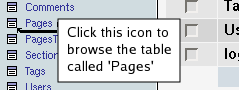
The normal way to seeing the contents of a table is to click on the table name in the left pane and then click on the 'Browse' tab in the top. But there is a one click way to do this - click on the small icon next to the table name in the left pane.

Click icon to browse table

Default Table Selection

When you access phpMyAdmin, you get the main page - after that you have to chose from the drop down which database should be used. Wouldn't it be useful if the database you use most would be automatically selected on loading? You can do this by accessing phpMyAdmin using the following URL.

http://localhost/phpMyAdmin/?db=my_fav_db

You will have to change the database name and the location to the one in your system - but you got the idea right?

Database Backup

There are many ways to take a database backup using phpMyAdmin - but my favorite way is to take an SQL Dump.

Select the database you want to backup and click 'Export' tab in the main frame. Now select all the tables in the select box. You can select the format of the backup - like SQL, CSV, XML etc. We will select the SQL option. It is recommended that you check the 'Add DROP TABLE' and 'Add IF NOT EXISTS' checkboxs. This will make sure that the existing tables will be removed when restoring the backup. Now check the 'Save as file' checkbox. Then click the 'Go' button. Now you should see a download option for the database backup. You can save this file to you harddisk and run it later if you want to restore the backup. If you did not check the 'Save as file' option, the SQL dump will be shown in a textarea.

This can also be done using the 'mysqldump' command in linux using the following command.

mysqldump --add-drop-table --user=root DATABASE> backup_file.sql

Table Backup

If you just need the backup of a single table, select that table from the table list in the left pane and click the 'Export' tab. Now do the steps described in the database backup section. Here only the selected table will be backuped.

This can be done using the following command.

mysqldump --add-drop-table --user=root DATABASE TABLE> backup_file.sql

Restoring a backup

Click the 'SQL' icon(SQL Icon) in the left pane - this will open a popup. Paste the SQL code you when you backuped the database in the textarea in this popup. Alternatively, you can chose the 'Import Files' tab in this popup and chose the location of the file you saved when backing up the data.

This is not a recommended method to restore large backup - if the backup file is more than 1 MB, don't try this. A better method is to upload the backup file to you host and restore the backup using the shell.

Read More...

Installing phpMyAdmin 2.8

phpMyAdmin Logo

The install instructions I provided earlier will only work in the earlier versions of phpMyAdmin. The latest version(2.8.2.1 - as of Aug 15, 2006) has a much easier way of doing this.

Get the latest version of phpMyAdmin from phpMyAdmin.net. The files will compressed - so you will have to extract it. Create a folder called 'phpMyAdmin' in the document root of your server and extract the PHP scripts into it. That's it - the installing part is over. The latest version will automatically configure itself to run with these settings...

  • Database Host : localhost
  • Username : root
  • Password : (Empty)
For the example we provided the last time, this is all that is needed. But if you wish to configure your phpMyAdmin using more advanced options, open the folder you installed phpMyAdmin to(<Document Root/phpMyAdmin/>) and create a folder called 'config'. Make sure it has write permission. You can give it write permission with the following command(assuming that your are on a linux system)...
chmod 666 config

Now open the URL http://localhost/phpMyAdmin/scripts/setup.php. This will help you configure your phpMyAdmin.

The configuration is very straight forward - so I am not providing much details about it. If you have any doubt, reffer the documentation that comes with the installation.

After you have finished configuration, click on the 'Save' Button in the 'Configuration' section. This will create a 'config.inc.php' file inside the 'config' folder that we created earlier. You will have to manually copy this config file to you phpMyAdmin folder. After this is done, delete the config folder. You can do this with the command...

mv config/config.inc.php .
rmdir config

On a personal note, I still prefer the 2.6 Version of phpMyAdmin. Some pages in the latest version have a tendency to create horizontal scroll bars even on 1024x768 resolution.

Read More...

Installing and Configuring phpMyAdmin

phpMyAdmin Logo

In the last post, I introduced phpMyAdmin. In this, we will deal with installation and configuration of phpMyAdmin.

UPDATE: This installation manual is for the older versions on phpMyAdmin. To see how to install the latest version, see the post Installing phpMyAdmin 2.8

My aim is to create a tool that could be used to administer your database in a development server. These directions are NOT for a production server. You will need much more security when installing phpMyAdmin on a production server. A good source for information on how to install phpMyAdmin securely is the series 'Doing more with phpMyAdmin'.

Installation phpMyAdmin

Get the latest version of phpMyAdmin from phpMyAdmin.net. The files will compressed - so you will have to extract it.

Create a folder called 'phpMyAdmin' in the document root of your server and extract the PHP scripts into it. That's it - the installing part is over.

Configuring phpMyAdmin

Necessary Information

Now we have to configure it - before starting this, make sure you have the following details...

  • Database Server address
  • Database Username
  • Database Password

For the sake of example I am going to assume that the following values...

  • Server : 'localhost'
  • Username : 'root'
  • Password : ''

Using the 'root' user with an empty password is one of the worst security blunders you can make - but what the hell, we are on a development server, right?

Editing 'config.inc.php'

Open up the file 'config.inc.php' in your favorite editor and edit the following values...

$cfg['PmaAbsoluteUri'] = 'http://localhost/phpMyAdmin/';

This is the absolute path for your phpMyAdmin directory. If you enter this location into a browser, phpMyAdmin should show up. I will not recommend that you use 'localhost' as the domain if you are on a network and expect others to connect to this phpMyAdmin setup. You should use 'http://<YOUR IP</phpMyAdmin/' in such a case. However if you are using phpMyAdmin for just your system, localhost will do fine.

$cfg['Servers'][$i]['host'] = 'localhost';

This is the database server address. If you look at the following lines in the file, you will notice that there is more than one instance of this line. This is for managing more that one database server using just one phpMyAdmin. Make sure that all the other hosts are set to empty - phpMyAdmin will ignore it if it is empty.

$cfg['Servers'][$i]['user'] = 'root';

The database user - in our case 'root'. Only the first instance of the line should be set - the other will be ignored if the 'host' option is not set.

$cfg['Servers'][$i]['password'] = '';

The password for the above given user - in this example we are using an empty password.

There are many other options - but you will not have to worry about them - they will do fine with their default values. However, if you are adventurous, feel free to experiment with the configuration options. The file well commented in detail - so you will have no trouble finding your way around - if you know a bit of PHP.

After all this is done, open up a browser and point it to http://localhost/phpMyAdmin/. If all went well, you will get the front page of phpMyAdmin.

References

Read More...

Managing Databases with MySQL Clients - phpMyAdmin

There are many MySQL Clients(or database administration tools) out there - MySQL Front End, Tora, mysql etc. But in the web environment, one client rules - phpMyAdmin. phpMyAdmin is a PHP based(obviously) GUI administration tool for MySQL.

When I began programming in Linux, I could not use the DB Administration tool my co-workers were using. They were using MySQL Front End - and only the windows version was available for it. Since no one in my office used Linux, none knew another DBA for Linux. One suggested Tora, but I could not get it to run - some dependencies were missing. Anyway, I was forced to use mysql - yes, the command line client that came with MySQL Server. You can start it by bringing up a terminal and entering 'mysql' into it. Then you type every SQL command you want to execute into it. Trust me, it was not fun. The biggest problems was that I want to copy something and press 'Ctrl+C' - in the terminal 'Ctrl+C' is not Copy - its Close. So the client goes down. It was very irritating. Anyway I found phpMyAdmin before long and have been using it ever since(even after I got Tora running).

The biggest advantages of phpMyAdmin is that it is web based - it runs on any server capable of handling PHP. Because of this all the online Database Administration is done using phpMyAdmin. If you have a site of your own, and you have the control panel access to it, you will know what I mean. They database management part will be handled by phpMyAdmin. The phpMyAdmin site cites the following as the features of phpMyAdmin...

  • Browse, view and drop databases, tables, views, fields and indexes.
  • Create, copy, drop, rename and alter databases, tables, fields and indexes.
  • Maintenance server, databases and tables, with proposals on server configuration.
  • Execute, edit and bookmark any SQL-statement, even batch-queries.
  • Create and read dumps of tables - in various formats like CSV, SQL, etc.
  • Export data to various formats: CSV, SQL, XML, Excel and more.
  • Administer multiple servers.
  • Manage MySQL users and privileges.
  • Check referential integrity in MyISAM tables.
  • Using Query-by-example (QBE), create complex queries automatically connecting required tables.
  • Search globally in a database or a subset of it.
  • Support InnoDB tables and foreign keys.
  • Support mysqli, the improved MySQL extension.
  • And more...

phpMyAdmin is so commonly used that there is a book - Mastering phpMyAdmin for effective MySQL Management - that aims to teach it.

Reference

Read More...

sql2json() - Converts SQL Results to JSON String

sql2json() converts the result of the given SQL query to its equivalent JSON string.

This function will take a SQL query as it argument, execute it, fetch its result and convert it to a JSON string and then return the JSON string. This very useful if your creating Ajax applications and decided to use JSON over XML. If you have decided to use XML, take a look at my XML Parser for JavaScript instead.

Be sure to checkout the Ajaxed Demo for sql2json().

Code


//Function will take an SQL query as an argument and format the resulting data as a 
// json(JavaScript Object Notation) string and return it.
function sql2json($query) {
 $data_sql = mysql_query($query) or die("'';//" . mysql_error());// If an error has occurred, 
   // make the error a js comment so that a javascript error will NOT be invoked
 $json_str = ""; //Init the JSON string.

 if($total = mysql_num_rows($data_sql)) { //See if there is anything in the query
  $json_str .= "[\n";

  $row_count = 0; 
  while($data = mysql_fetch_assoc($data_sql)) {
   if(count($data) > 1) $json_str .= "{\n";

   $count = 0;
   foreach($data as $key => $value) {
    //If it is an associative array we want it in the format of 'key':"value"
    if(count($data) > 1) $json_str .= "'$key':\"$value\"";
    else $json_str .= "'$value'";

    //Make sure that the last item don't have a ',' (comma)
    $count++;
    if($count < count($data)) $json_str .= ",\n";
   }
   $row_count++;
   if(count($data) > 1) $json_str .= "}\n";

   //Make sure that the last item don't have a ',' (comma)
   if($row_count < $total) $json_str .= ",\n";
  }

  $json_str .= "]\n";
 }

 //Replace the '\n's - make it faster - but at the price of bad redability.
 $json_str = str_replace("\n","",$json_str); //Comment this out when you are debugging the script

 //Finally, output the data
 return $json_str;
}
Read More...

Query() Function for PHP

query() function is a PHP function will accept a query as its argument and return the data in different formats based on the result of the query.

For more information on this function, go to my PHP query () Function page.

The Old Method

I used to have four different functions in a small class for MySQL operations -

query()
$sql->query("SELECT * FROM users WHERE user_id='1'");
This will return the first row of the result of the given query.
array (
 'user_id' => 1,
 'user_name' => 'Binny',
 'user_url' => 'http://www.bin-co.com/',
 'user_status' => '1'
)
getOne()
$sql->getOne("SELECT user_name FROM users WHERE user_id='1'");
This function will return the first item of the first row of the given row.

Binny

getAll()

There are two different results for this function...

$sql->getAll("SELECT user_name FROM users WHERE user_status='1'");
This type will return all the items in the result as an numerical array.
array (
 [0] => 'Binny',
 [1] => 'Another Guy',
 [2] => 'Yet Another Guy'
)
$sql->getAll("SELECT user_id,user_name FROM users WHERE user_status='1'");
This type will return all the items in the result as an associative array - the first item(user_id) will be the index for the array.
array (
 [1] => 'Binny',
 [3] => 'Another Guy',
 [7] => 'Yet Another Guy'
)

New Method

All these functions were really helpful - but then I got this bright idea to combine all these functions into one single function. And that is what I have done.

Right now, this function only supports MySQL - I use this most - but it can be easily edited to support others.


function query($query) {
 if(!$query) return "";

 $result = mysql_query($query) or die("MySQL Error : " . mysql_error() . "\n<br />In Query <code>$query</code>");

 if(mysql_num_rows($result) == 1) { //If there is just one result, return it.
  $arr = mysql_fetch_assoc($result);
  if(count($arr) == 1) { //If there is just one result...
   $item = array_values($arr);
   return stripslashes($item[0]); // Creates the effect of 'getOne()'
  } else {
   foreach($arr as $key => $value) $arr[$key] = stripslashes($value);
   return $arr; // Makes the 'query()' effect
  }

 } else {
  $arr = array();
  $primary_key = false;

  while ($all = mysql_fetch_row($result)) {
   if(count($all) == 1) array_push($arr,$all[0]);
   elseif(count($all) == 2) {
    if(!$primary_key) { //Happens only one time
     $meta = mysql_fetch_field($result,0); //If the first element is a primary key, make
     $primary_key = $meta->primary_key;  // the result an associative array.
    }
    //Make it an Associative Array if there is a primary_key in the given data.
    if($primary_key) $arr[$all[0]] = $all[1];
    else break;
   }
   else break;
  }
  if($arr) {
   //Do a stripslashes() on each element
   foreach($arr as $key => $value) $arr[$key] = stripslashes($value);
   return $arr; // For 'getAll()'

  } else { //If nothing matches...
   mysql_data_seek($result,0); //Reset the Query.
   return $result; // This results in 'getSqlHandle()' effect
  }
 }
}

Problems

This function is too new for me to notice any bugs. I was hoping that maybe you could find some. One problem is there - readability. If some is reading the code you wrote using this function, they will have a hard time understanding what is happening. For example...

$name = query("SELECT name FROM people WHERE id='2'");
print "Hello, " . $name;

/* ... later in the program ... */

$all_idiots = query("SELECT id,name FROM people WHERE is_idiot='1'");
foreach($all_idiots as $id=>$idiot) {
 /* ... whatever ... */
}

/* ... even later ... */

$sql_result = query("SELECT * FROM people WHERE status='1'");
while($row = mysql_query($sql_result)) {
 /* ... whatever ... */
}

This will really confuse the reader. He will have no idea what the function does - of course you could put some comments on the function - but he would still have to wade through all the included files to find the file with the function to read the comment.

Filed Under...

Read More...

Compressing JavaScript file on the fly using JSMin

JSMin is a Javascript source compressor created by Douglas Crockford. The PHP version of this software can be used to compress JavaScript source files 'on-the-fly' - just before serving it. This approach will save your bandwidth without the need for keeping two versions of a script - a compressed one and an uncompressed one. The main disadvantage of this approach is that it is not processor friendly.

There are many other javascript compressors available(including one written by yours truly). Some of the popular ones are given below.

The default method of compression for the JSMin is using a C program but a PHP version(text file) is also given. You can use this to compress your javascript 'live'. If you make an update to the file, you won't have to compress it before uploading it. But this method is processor expensive as some processing must be done to compress the file every time the file is requested.

To use this on your site download the PHP version of JSMin script and rename it to 'jsmin.php'. Then add the following lines at the end of the file - just above the '?>' line.


$js_file = $_GET['file'];
if(file_exists($js_file) and is_readable($js_file)) {
 header("content-type:text/javascript");
 jsmin($js_file);
}

After the jsmin.php file is configured, you can call any of your javascript script using this HTML
<script src="jsmin.php?file=your_js_file.js" type="text/javascript"></script>

Even though the 'your_js_file.js' file is not in the compressed format, it will be compressed by our script before it reaches the browser - saving your precious bandwidth.

Filed Under...

Read More...

MD5 is Dead - use SHA1

MD5 has been on its last legs for some time - now it is 'offically' dead. A C program has been released that can find the collitions of a given MD5 Hash within just 45 minutes on a decent computer. MD5 has been proven to be a weak algorithm for some time now - infact, it had been banned from microsoft in support of better algorithms like SHA.

If you are building a new application, think twice before using MD5 to encrypt the passwords - use SHA instead. PHP has a function sha1() that can be used to find the hash of any string. Example...

$encrypted_password = sha1($_POST['pass']);

MySQL also has a SHA function - you can use it like

mysql> SELECT SHA1("abc");
    -> 'a9993e364706816aba3e25717850c26c9cd0d89d'

# OR from PHP as 

mysql_query("INSERT INTO users(login,password) 
VALUES('" . addslashes($_POST['username']) . "', SHA1('" . addslashes($_POST['password']) . "')");

# OR as

$sql_handle = mysql_query("SELECT user_id FROM users 
WHERE user_login='".addslashes($_POST['username'])."' 
AND user_password=SHA1('".addslashes($_POST['password'])."')");

If you want to find the password that was encrypted using MD5, you are better of using the Online Hash Database. This is a database having a huge number of MD5 Hashes and its plain text counterparts. So if you input a MD5 hash, it will search its database to find which text has the given MD5 hash. This system will be defeated if you use a salt when creating the hash.

Filed Under...
Categories :
Technorati Tags:
Read More...

Dump() Function - Javascript equivalent of PHP's print_r()

The moment I saw the print_r() function of PHP, I fell in love with it. It is a very necessary function and I cant understand why no other language supports it. Perl does - if you are using the Data::Dumper module. I have created a function in PHP that will call print_r() function. It will put the code generated by the print_r function inside <pre> tags. That will make the data readable from the browser.

Latest Version of Dump() Function - Javascript equivalent of PHP's print_r() available at OpenJS

/** Function : dump()
* Arguments  : $data - the variable that must be displayed
***********************************************************************************
* Version    : 1.01.B
* Author     : Binny V A(binnyva (at) hotmail (dot) com : http://www.geocities.com/binnyva)
* Date       : June 3, 2005
* Last Update: Wednesday, July 13 2005
* Prints a array, an object or a scalar variable in an easy to view format.
***********************************************************************************/
function dump($data) {
if(is_array($data)) { //If the given variable is an array, print using the print_r function.
 print "<pre>-----------------------\n";
 print_r($data);
 print "-----------------------</pre>";
} elseif (is_object($data)) {
 print "<pre>==========================\n";
 var_dump($data);
 print "===========================</pre>";
}
else {
 print "=========&gt; ";
 var_dump($data);
 print " <=========";
}
}
I have ported the print_r function to javascript - hope that you will find this useful.
/**
* Function : dump()
* Arguments: The data - array,hash(associative array),object
*    The level - OPTIONAL
* Returns  : The textual representation of the array.
* This function was inspired by the print_r function of PHP.
* This will accept some data as the argument and return a
* text that will be a more readable version of the
* array/hash/object that is given.
*/
function dump(arr,level) {
var dumped_text = "";
if(!level) level = 0;

//The padding given at the beginning of the line.
var level_padding = "";
for(var j=0;j<level+1;j++) level_padding += "    ";

if(typeof(arr) == 'object') { //Array/Hashes/Objects
 for(var item in arr) {
  var value = arr[item];
 
  if(typeof(value) == 'object') { //If it is an array,
   dumped_text += level_padding + "'" + item + "' ...\n";
   dumped_text += dump(value,level+1);
  } else {
   dumped_text += level_padding + "'" + item + "' => \"" + value + "\"\n";
  }
 }
} else { //Stings/Chars/Numbers etc.
 dumped_text = "===>"+arr+"<===("+typeof(arr)+")";
}
return dumped_text;
} 
This is how the function is called. In this example we will give a complex array as the argument.
//Calling the function...
function init() {
var arra = new Array("Hloo",'s',23,23.1,"Hello World");
var assoc = {
 "val"  : "New",
 "number" : 14,
 "theting" : arra
};

alert(dump(assoc));
}
window.onload=init;
The result will be shown in the following format.
'val' => "New"
'number' => "14"
'theting' ...
   '0' => "Hloo"
   '1' => "s"
   '2' => "23"
   '3' => "23.1"
   '4' => "Hello World"
Technorati Tags:
Del.icio.us Tags :
Read More...

PHP Security

A few days ago I read an article on PHP Security on ILoveJackDaniels.com. I could not even begin to stress the importance of the concepts said there. Some of the major points said there are...

Don't give any files the extension '.inc'.

Some people will give the files that are included this extension - as in...
include('./connect.inc');//Connect to the database.
and include this line in every file of the page. The programmer must use the username amd password of the database connection in this file. The problem is that if any user will type the direct address to file in the browser, he can see the username and password. Like this - http://www.example.com/connect.inc. But if the extension is '.php' this big security threat can avoided - as the server will parse the file before showing it. If you make a small search in google to find how many people are affected by this, you will be surprised - as I was.

SQL Injection

Please do a 'addslashes()' on the data comming from the user. If you ignore this you will be vulnurable to a hack attempt called SQL Injection. This happens when the visitor inputs a SQL query as the form data and you code executes it.

For example, consider the authentication code

mysql_query("SELECT * FROM table WHERE username='$_REQUEST[user]' AND password='$_REQUEST[pass]'");
Any person can run an sql query on this code. Just input the following as the username...
' OR 1=1;#
This will cause the query to by
mysql_query("SELECT * FROM table WHERE username='' OR 1=1;#' AND password=''");
See what happens? The query gets executed! Now if this a malacious guy, he will not stop there. He will try something like...
'; DROP * FROM table;#

Many more...

There are a lot more things to watch out for - read the article to know more about them. It is a three part article and read atleast the first two sections. I would recommend that you read all three sections - if you are really serious about PHP programming.

phpInfo()

A point that the author has missed is the threat by the phpInfo() function. I often make a file with this funtion at the begining of the project to see the server info. Some time I neglect to delete this file. I don't have to say what kind of damage a hacker can do with the kind of data given in the phpInfo() function. So, if you make a phpInfo() file, please don't forget to delete it.
Read More...

Subscribe to : Posts