Site Moved

This site has been moved to a new location - Bin-Blog. All new post will appear at the new location.

Bin-Blog

I have moved my Blog

Every commenter in the last post agreed with me. As a result, I am moving the blog from http://binnyva.blogspot.com/ to http://www.bin-co.com/blog/. From the next post onwards, the post will be duplicated here and in my Bin-Co site. At the end of this month, I will abandon this blog and focus on the new one.

Abandon does not mean that I will delete the blog or its contents - that will stay. I will stop posting here. I will still carry out some maintenance tasks like weeding out the spam, repling to comments etc. However, from next month, no more new content will appear here.

So the new blog URL is ...drum roll...

Bin-Blog

Take a look - no contents yet. But still, feel free to look around my Bin-Co site too.

Content Duplication

One of my tougher decision was not to import the contents of this blog into the new one. So, the contents in this blog will not be there in the new blog. One major reason is content duplication. I don't want to be penalized for duplicate content.

Feed

Please DO NOT update/change the feed URL. I am using FeedBurner - and I will change the source feed when the time is right. So, you don't have to change the feed URL.

Read More...

Should I move my Blog?

Lately, I am under a lot of pressure to move this blog to one of my own servers. I have thought about this before. I even have moved parts of it - like BinnyVA and OpenJS - but never moved the site entirely. Moving has its advantages and its disadvantages. Before I make the decision, I thought I will ask the site's readers for some feedback. So, what do you think guys? Should I move to my own domain?

Advantages of Moving

More Serious
A blog that has its own domain will be considered by many to be more serious than a blogspot site.
WordPress!
A self-hosted WordPress blog is a better blogging platform than Blogger
Control
WordPress gives the user a lot more control than blogger
Easier Commenting
I can take the captcha out of commenting - Akismet will protect me from spam - even though there is some problems - like false positives.
Google Juice Sharing
If I move, I plan to move my blog to http://www.bin-co.com/blog/.
So all the SEO advantage for the blog will be available for Bin-Co.com and all its SEO advantage will be available for the blog. A nice setup.

Disadvantages

SEO
I have many links pointing to this site - this includes one Digg Homepage appearance. I will lose all those advantages if I move away. This is the main reason I have not moved away yet.
Maintenance overhead
even though there is automatic installation and updating for WordPress in Dreamhost.
Server Capability
In the event of a Digging, a blogger site has more chance of staying alive than a smaller site. But I believe my hosting can take a beating before going down. But still, Dreamhost has its, how shall I put it..., issues.

What do YOU think?

I am forced to consider this move because many people have asked my why I am still on Blogger - despite having many sites of my own. Look at the comments on my last post - Benedict Herold has only one thing to say. Can't blame him - he already has made the move - from Blogger to WordPress. He even has a neat picture to explain which is the better platform.

Then there is Ajay. Says he won't comment on my site unless I move to wordpress. When ever I chat with him, he wants to know if I will move to wordpress ;-). So, Ajay, here is your chance to have your say - should I move or not. Comment on this post, OK? Even if you think it is a bit slow for you.

Think of this as a voting system. If enough people ask me to move, I will move. I am sure that many of my readers will have some thoughts regarding this as well.

So, what do you think? Should I make the move? Leave a comment. Do you have any experience to share about moving your blog? Let me know.

Read More...

I am NOT Spam!

When I was making the last post, I noticed something that was not there before - a word verification for posting. It was a rude shock for me - like a surcharge in a formerly surcharge free ATM. Turns out, the great Google bots think that this is a spam blog. Guys, this is not a spam blog! I have a spam blog - but this is not it.

Your blog requires word verification

Blogger's spam-prevention robots have detected that your blog has characteristics of a spam blog. (What's a spam blog?) Since you're an actual person reading this, your blog is probably not a spam blog. Automated spam detection is inherently fuzzy, and we sincerely apologize for this false positive.

Luckily there was an option to say that this blog is not spam. Needless to say, I used that option, and they sent out real humans to test my site. Before long, I was cleared of all wrong doings :-)

We received your unlock request on April 5, 2007. On behalf of the robots, we apologize for locking your non-spam blog. Please be patient while we take a look at your blog and verify that it is not spam.

All jokes aside, I appreciate the fact that the Blogger team is working hard to get rid of the spam blogs in blogger. Blogger is just infected with those. A side effect of this is that I cannot comment on other people's blog using my blog's address(http://binnyva.blogspot.com/) as the URL. Akismet thinks that since I use a blogger site, my comment must be spam.

Just a friendly reminder to the guys using Akismet Plugin - its great for blocking spam - I use it myself. But there is quite a few instance of false positives - ie. legitimate comments marked as spam. So make sure you check the spam folder often. False negatives I can stand - but not false positives. That's bad.

Read More...

Using Twitter, Part 1 - Command Line Twitter Client

You may have heard of Twitter - if not, it is a microblogging platform that allows members to tell each other what they are doing and what they think. There was a huge buzz about twitter recently - made me create an account on twitter. I tried to post through the web interface - but that's not a very intuitive method. The IM method is much better - but it almost never works. So I ended up making another method - the CLI method. Or twittering using the Command Line.

Before going any further, let me say that this method is for Linux. You can use this method in windows as well - but you have to install the windows port for curl. Even if you manage to get this method to work on windows, most of the major advantages of this method will be lost.

This SxSW was huge for twitter - not only did it win the 2007 South by Southwest Web Award, they also got a lot of new members. But lately it is getting some negative reviews as well.

Quick Posting

One of the main feature of twitter is the fast publishing time. You type something into a text box and click submit - and the stuff is published. That's fast! The only problem is that you need to open a browser and type in the URL to get to that text box. I need something faster. The IM method is a bit faster - but it rarely works. This situation will change in the future - but I don't want to wait.

The fastest method I can think of is like this - I press a keyboard combination and an small text box opens up. I type in the status and press Submit and this application will post the data to the twitter site using the Twitter API. The only problem is there is no such application. That's when I decided to do something about it. Of course, I am too lazy to create an entire application for it - so I had to settle for the next best method - posting from a terminal.

Posting from a Terminal

I have configured my system to open the Terminal(konsole) when I press Ctrl+Alt+A. Now all I have to do is create a command, say, 'twitter' that will publish the command line arguments to the twitter site. My input will be something like this.

Ctrl+Alt+A
twitter "Using the CLI Twitter client"

That's fast enough for me.

Twitter API

To create the script, I took a look at the twitter API...

All of the methods (except for the public timeline) require user authentication via Basic Auth. The username is the email address you have stored on Twitter, the password, your password.

....

Updating your Twitter

Done with a HTTP POST using the "status" parameter. status=Walking the dog.

  • http://twitter.com/statuses/update.json
  • http://twitter.com/statuses/update.xml

The simplest API I have ever seen.

Curl

After I saw that API, I realized that I don't need to do any coding to create the application - I just need to use the curl command. curl is a tool to transfer data from or to a server. All I have to do is execute this command...

curl --basic --user "<User>:<Password>" --data-ascii "status=<Twitter status>" "http://twitter.com/statuses/update.json"

In my case it will be

curl --basic --user "binnyva:******" --data-ascii "status=Using Twitter from command line" "http://twitter.com/statuses/update.json"

The Twitter Shell Script

But I don't think you would like to type all that everytime you want to twitter. So we have to put it into an executable file. Also, we have to modify the script to enable the support for command line arguments.

curl --basic --user "<User>:<Password>" --data-ascii "status=`echo $@|tr ' ' '+'`" "http://twitter.com/statuses/update.json"

Replace the <User> and <Password> with your twitter user id and password. Now save the text to a file called 'twitter' and give the file execute permission. Put this file in any folder in your path(like /usr/local/bin or ~/bin)

Using Twitter CLI

Just call the command with your message as the argument - like this

twitter Writting Content for Bin-Blog about twitter.
twitter "Using Twitter CLI"

For best results, enclose the message within quotes. This will prevent problems when using wild card characters like '?'

Twitter Users

Before I leave, how many of my readers are twitter users? OK, you three - leave a comment with your twitter ID. By the way, I am binnyva.

Another thing - this script is thrown together in a very short time - is there a better, more foolproof way of doing this? If you know one, leave a comment.

Read More...

Saving Code Snippets - Part 2

Fileing

In the last post, we saw various methods of storing text snippets. Each of the discussed methods had its advantages and disadvantages. I could not use any of those methods. But eventually I found one method that was perfect. It was WordPress.

My requirements for a text snippets storing system are simple...

  • Must be able to store text snippets (Duh!)
  • Searchable
  • Tagging support
  • Easy to use interface
  • Backupable

After looking at the list for a few moments, I had an epiphany. I don't need a custom solution for this problem - all I have to do is make a few adjustments to a system I am already using. I already have experience using WordPress - so there is no learning curve.

So, I created a new domain and installed WordPress using Dreamhost's One Click install system. I made a few adjustments to the default configuration, installed a few plugins, customized the theme - and I have a shiny new site...

txt - Text Snippets collection of BinnyVA

Go on, click on that link and play around on my Text Snippets collection for a while - I'll wait.

Storing Text Snippets using WordPress

Advantages

New Site
You have a new site which will be updated frequently - without having to put much effort into it. Another plus point is that your collection is useful for others also.
Stable/Supported Platform
WordPress is an industry standard Platform - used by thousands of people world wide. If you run into a problem, you will be able to get help.
Open Source
You can modify the software - and make it 'just right' for your need.
Offline Access Possible
Just install the WordPress on your system and sync the database once in a while.
Multiple Clients can be used
You are not forced to use the WordPress's web interface to add/edit snippets - there are a lot of clients that support WordPress. I prefer ScribeFire(was known as Performancing earlier).

Disadvantages

  • Added overhead of managing a new site
  • Need Hosting
  • Need net access
  • Need a web/database server for Offline site
  • The purpose of the tool is different

Tagging Problem

There was one problem associated with using WordPress for this purpose - tagging. Sure, you could use categories to tag each snippet - but that is nowhere as intuitive as, say, tagging on del.icio.us. To add a new category, you have to use a separate text field - instead of just typing it after a ','. That is when I found out about a great WordPress plugin - Ultimate Tag Warriors.

Ultimate Tag Warrior

Using Ultimate Tag Warrior you can tag your post with multiple tags. These are completely independent of the 'Categories' feature of wordpress. Two important features for this plugin makes it perfect for our purpose.

Friendly Link support

del.icio.us style links makes it easier for us to find the snippets later on. For example, the URL for all the text snippets with the tag 'perl' is http://txt.binnyva.com/tag/perl.

Can embed tags inside the content

You can specify the tags within the content of the post - you are not forced to use the web panel's tags field to do it. This makes it possible to tag the text snippets even if you are posting from a client.

All you have to do is is enclose the tags within '[tags]...[/tags]'. For example, say you wish to tag a snippet, with database, mysql, sql. So you put this at the end of the snippet...

[tags]database, mysql, sql[/tags]

txt

My Text Snippets collection site have been running for two months. As of yet, I don't have a single complaint about it. In my opinion, this is the best method to store text snippets. If you know a better way of doing this, please let me know.

Most of the saved snippets on txt are Linux Commands. There are some code snippets as well. This is a site where I store script snippets, Linux commands and other such tidbits of information. The posts will be minimal and often crude.

Before leaving you, I want to highlight some cool snippets in that site...

And for Linux users...

Read More...

Add Feedburner's FeedFlares to your Feed

If you are an RSS junkie you would have noticed that many feed have small links at the bottom of the post that can be used to digg the post, email it, subscribe to the comments of that post etc. These is a feature of feedburner - it is called Flares. According to Feedburner "FeedFlare is a one-step service that enables publishers to configure a very slim "footer" containing customizable actions that will appear beneath each item in a feed.

For the longest time I thought that this was available only for paid uses of feedburner service - but I was wrong. If you use feedburner, you could use flares in your feed. And that is exactly what I did - if you are reading this post using a feed reader, just go to the bottom of this post and you will see the flares.

How to Add flares to your Feed

Before anything, you must be using feedburner to deliver your feed if you want this feature. If you are using feedburner, continue reading. If you are not using feedburner, its game over for you.

  • Got to Feedburner Login page and Login into your account.
  • Click on the feed you want to add the flares to.
  • Click on the 'Optimize' tab.
  • Click on the FeedFlare tab on the left sidebar.
  • Select all the flares you want to add to your feed and submit the form.

An image to make things clearer...

Thats it. Now all the posts in that feed will have the flares at the bottom.

Custom Flares

The flare form only displays the default flares. But it is possible to create and use custom flares using the open FeedFlare API. See the Flares Catlog and 101 FeedFlares for a Better Tomorrow to find all the flares that can be used.

Don't Clutter

A word of warning before you add the flares to your feed - don't use too many. It is easy to abuse flares by adding many of it. Please make sure your feeds are clutter free.

Related Links

Read More...

De-lurking day for all you Lurkers out there

I always wanted to do a 'de-lurking' post. Two of my favorite web development bloggers - 456 Berea st and veerle's blog have done it. So I have decided to join in and create a de-lurking post of my own.

What is De-lurking?

A lurker is a 'person who reads discussions on a message board, newsgroup, chatroom, file sharing or other interactive system, but rarely participates'. De-lurking is an operation to get you out in the open. Basically what you need to do is post a comment for this post.

What do I write in the Comment?

I would like the following details...

  1. Your Name
  2. Your field
  3. URL(if any)
  4. What kind of articles would you like to see on my blog?

I am always on the lookout for new blogs to add to my RSS Aggregator. I figured the best way to do that is to find people who have the same interest as me - if you read my blog, you will be interested in Web Development. And that is the topic I am most interested in.

If you leave your URL, I will take a look at your site. And if you have great articles I will even link to it. So please leave your URLs.

But, please... please... comment. Even if you comment is just 'Hi', post it, all right?

Filed Under...

Read More...

Bests Posts in 2006

Happy new year, all! This year I will continue the tradition of highlighting the best posts of the year at the end of the year(or at the beginning of the next - as in this case). The best posts in 2006 in this blog are...

Articles

A Gentle Introduction to Ajax
Ajax or Asynchronous JavaScript and XML enables the programmer to execute a server-side script without refreshing the page. This is a three part series that teaches the basics of Ajax.
CSS Shorthand
CSS Shorthand is a method to compress multiple declarations into one declaration. Two or more related declarations can be compressed to form one easily readable declaration.
Ajax Response Data Formats
Some time ago, Peter Paul Kosh wrote an article about the different types of Ajax data formats - The AJAX response: XML, HTML, or JSON? This is my take on the subject
Web Development in Linux
Linux is a better platform for Web Development than Windows can ever hope to be. Most of the thing you would need in a development server like a Web Server, Database Server, PHP, Perl, Python, Ruby etc. are already present on any decent distribution. Linux has browsers(Firefox,Konqueror,Lynx,etc.), design tools(Gimp), editors(Quanta Plus,Emacs), programming tools(CVS,Cervisia) - in short, everything you need for web development. This is the longest series in my blog - in is not over yet.
Using Gimp to make Web 2.0 Buttons and Graphics
There are many tutorials about creating buttons and graphics in the new 'Web 2.0' style. Unfortunately, all these tutorials are for Photoshop users. The Gimp users are completely ignored. So, I have decided to correct this error - this is a tutorial on how to create a Web 2.0 style button in Linux using Gimp(will work in windows as well). A four part series.

Scripts

Inline Perl code in HTML
One of the main advantage of using PHP is that you can embed PHP code inside HTML files - just give it the extension '.php' and the server will parse it and serve the resulting page. In Perl, you will have to embed HTML code in perl's print statements - this is a much tougher approach. So I created a perl function that will let you insert Perl code within HTML files using <?perl ... ?> tags.
Live Validator - JavaScript Field Validation Script
Live Validator is a JavaScript program that will validate any form field as the user types the data using the regular expressions that you have specified. To see a working example, visit the registration page of OpenJS.
Query() Function for PHP
query() function is a PHP function will accept a query as its argument and return the data in different formats based on the result of the query.
XML Parser function for JavaScript - xml2array()
I have created a small function called 'xml2array()' that will take an XML document as the argument, parse it and return an associative array as the result. This array will contain the data of the XML file - which can be easily accessed. This function is available in PHP too - xml2array() - XML Parser for PHP
Updated version of jx Ajax Library
x is a small toolkit for providing AJAX support in JavaScript. To get the latest version of this script, go to jx - JavaScript Ajax Library
Read More...

Blogger Changed the Feed URL for Blogger Beta Sites

Blogger have changed the URL of the feeds of all the blogs that have upgraded to Blogger beta. In the previous version of blogger, the feeds were located in the location...

http://<blogger_id>.blogspot.com/atom.xml
(Eg. http://binnyva.blogspot.com/atom.xml )

Now it is in...

http://<blogger_id>.blogspot.com/feeds/posts/full
(Eg. http://binnyva.blogspot.com/feeds/posts/full )

This is a bad move by blogger. I just can't understand why they did it. They least they could do is redirect all traffic to the old location(http://binnyva.blogspot.com/atom.xml) to the new location(http://binnyva.blogspot.com/feeds/posts/full). By best bet is that they want to use REST architecture.

Another thing I don't understand is the result that is returned by the server when the feed URL is accessed. It returns the status 400 - Bad Request. Not 404(Page not found) but 400. I wish they would change this to 301(Moved Permanently) and redirect the user to the new feed location.

UPDATE : This problem is fixed now! Thanks Guys.

Syndication Errors

So why is this a bad thing? Why am I complaining when a page is moved. The answer is simple : Syndication. Many people who have subscribed to my feed using the old URL will not be able to access the feed. Many indexers like Technorati, Syndic8 etc. will not be able to access and index my blog. All because the URL for feed is changed.

Fortunately for me, I am using the Feedburner service. So I don't have a problem if the feed is moved. I just change the 'Original Feed' location in my feedburner account, and the the visitors will get the new data - without even noticing the change. If you are worried that Blogger will change the feed again, go register for this service(its free).

But I used the URL 'http://binnyva.blogspot.com/atom.xml' whenever I submitted my blog to an automatic indexer(Technorati,IceRocket,etc.). Now I will have to go around and update all those sites.

Bad move blogger. Hope you fix this issue soon.

New Features

That said, I have to admit the new feed system is cool. You can specify some quires and you will get a feed based on those quires.

For example, you can use the URL http://binnyva.blogspot.com/feeds/posts/full?max-results=5 and get the latest 5 posts instead of the default 25 new posts. Also there is a provision to get the feed for the comments of each post.(Eg. http://binnyva.blogspot.com/feeds/2591766938765279155/comments/full is the comments for the recent Fedora Core 5 - 64bit Vs 32bit post)

Some quires that work with the XML feed. There might be more, but these are the only ones I know. If you know any that are not included here, let me know and I will include them.

URL : http://binnyva.blogspot.com/feeds/posts/full

Parameters

max-results
The number of posts that should appear in the XML(Default : 25). Example : http://binnyva.blogspot.com/feeds/posts/full?max-results=5
start-index
The post from which the listing should be taken. 1 means latest, 2 means second latest and so on(Default : 1).

I think they are using an updated feed creator - the version given in the generator tag have changed. The new XML feed has Generator 'Blogger 7.00' while the older one has 'Blogger 6.72' as the generator.

RSS/Atom

Another thing I noticed was that the feed is available only in the atom format. In the previous version, they had both the Atom Format and the RSS format. Atom was available at http://binnyva.blogspot.com/atom.xml while RSS could be accessed at http://binnyva.blogspot.com/rss.xml . I can't find any way to get the RSS format in the new release(Blogger 7.0). Do any of you know where I can access the RSS format of the feed?

Filed Under...

Read More...

Blogger Beta

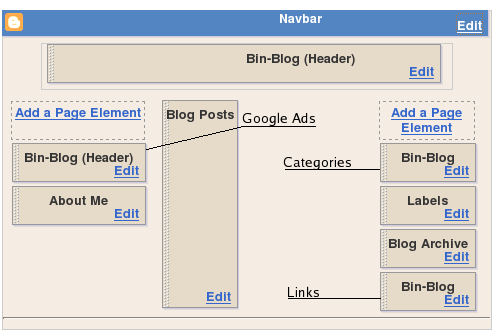
I have upgraded to Blogger Beta - now I can access many more features - like labels, WYSIWYG template modification etc. Since I use a customized blog design, it has not been easy. In fact, it was quite hard. But was it worth it? I don't know yet.

New templating Language

The templating language has been changed entirely. Many new features have been added - and the complexity have gone up greatly. I understood the language - but I don't think anyone without a programming background would spend enough time to study it.

Loops

The <b:loop ... > tag lets you repeat a section of content multiple times with little or no changes. Example...

<b:loop var='post' values='data:posts'>
   <h2><data:post.title/></h2>
</b:loop>

Conditional Statement - If/Else

Shows the content only if the given statement is true(or false). Example...

<b:if cond='data:blog.url == data:blog.homepageUrl'>
 <data:title/>
<b:else/>
 <a expr:href='data:blog.homepageUrl'><data:title/></a>
</b:if>

Section - Widget - Include

The Section/Widget/Include system make the Drag and Drop template editing system possible. The section is a top level container which can contain multiple widgets. A widget can have many 'includable's. The includable with the id 'main' will be shown by default. You can display the other includable using the code '<b:include name='ID_OF_INCLUDABLE'/> Some sample code - this code shows the header of this blog...

<b:section class='header' id='header' maxwidgets='1' showaddelement='no'>
<b:widget id='Header1' locked='true' title='Bin-Blog (Header)' type='Header'>
<b:includable id='main'>
<h1 id="blog-title">
<b:if cond='data:blog.url == data:blog.homepageUrl'>
<data:title/>
<b:else/>
<a expr:href='data:blog.homepageUrl'><data:title/></a>
</b:if>
</h1>
<p id="description"><data:description/></p>
</b:includable>
</b:widget>
</b:section>

Very powerful - but complicated.

In Conclusion

I like the new templating system - it is complicated, but very powerful. If you are willing to spend the time to study it, you can make magic. Kudos to the Blogger team for bringing it out.

If you notice any problem this blog, let me know. I not have tested this in IE yet - I have linux remember?

Did you move your blog to blogger beta? Why not? If you did, how did it go? Leave some comments.

References

Filed Under...

Read More...

Best Blog Posts of the First Century

As you probably know, I have reached the 100 posts milestone. It is traditional to make a 'Best of 100' post at this point. So here it is - 5 best content pages and 5 best scripts...

Best Content Pages

A few mini-tutorials that many found useful.

AHAH(Asynchronous HTML over HTTP) - AJAX 2.0
AHAH or Asynchronous HTML over HTTP is a much simpler version of AJAX. Using AHAH approach in JavaScript you can display external XHTML pages inside your HTML page. The beauty of the script is that it is so very simple - the underling code is just twenty lines!
CSS Shorthand
CSS Shorthand is a method to compress multiple declarations into one declaration. Two or more related declarations can be compressed to form one easily readable declaration.
A Gentle Introduction to Ajax
The First part of a three part Ajax Tutorial. Also see the second part and the third part of the tutorial.
CSS Coding Style
I don't have to tell you the effect on readability when a big CSS file is created with the first style of coding - it will be impossible to find anything without wading thru the code for some time. On the other hand, the same task will be a piece of cake if the code is in the second form. So here, I am trying to make a coding style for writing CSS code.
SiteMaps - A New Technology from Google
Google came up with something new - a method in which webmasters tell the search engines which all files must be indexed, where it can be found, and how important it is. Till date, search engines index a site by scanning the html files for links to other files.

Best Scripts

I created many small functions - JavaScript, PHP, CSS, Perl and published it in this blog so that others could use it too. The best among these are given below...

XML Parser function for JavaScript - xml2array()
I have created a small function called 'xml2array()' that will take an XML document as the argument, parse it and return an associative array as the result. This array will contain the data of the XML file - which can be easily accessed.
sql2json() - Converts SQL Results to JSON String
sql2json() converts the result of the given SQL query to its equivalent JSON string.
Creating DOM in a much easier way
Everyone who have tried their hand at creating a DOM structure using the W3C method knows that it is not easy. It is a piece of cake using innerHTML. But when we try it using W3C methods like document.createElement, we will find that it takes ten times more time.
Dump() Function - Javascript equivalent of PHP's print_r()
The moment I saw the print_r() function of PHP, I fell in love with it. It is a very necessary function and I can't understand why no other language supports it. So I have ported the print_r function to javascript.
My Custom JavaScript Functions
Dustin Diaz have recently written an article on Top 10 custom JavaScript functions of all time. So I thought that I would write about all the functions on my common.js file.

Filed Under...

Read More...

100th Post

100th Post

An year after the first post, I have reached the 100th post milestone. So a best of 100 post is traditional - that will be my next post. But before that, my experiences with blogging...

My Reasons for Blogging

I listed number of reasons on why I started a blog in the first post. Over the course of time, the list was improved - some reasons were removed and some were added. This is the new list(in no particular order)...

Encouragement to create content
The blogger calender script was created for this purpose - to force me to sit down and write content. It succeeded it that goal - I am creating enough content to make a new site from it.
Improve my English
If you have been reading my blog for some time, you probably noticed that my English have a lot room for improvement ;-).
Help Others
I have received letters from many people saying that some of my posts were of great help for them - JSMin Compression, JavaScript Functions etc. are great examples.
Bring Traffic to my other sites
This blog is a great success in this field - whenever I added a new page to my main site, I announce it here. As a result, over 15% of vistors to Bin-Co comes from here.
Make Money
Unfortunately, this is one of the areas where I failed. Don't get me wrong - I make a good amount of money through AdSense - but very little of that comes from the blog. I am hoping this trend will end soon.

Some Stats

Some of the statstics associated with this blog...

Number of Posts
100 - but you already know that.
Average vistors per day
Around 50 - on Monday through Friday.
AdSense Money from the Blog till date
Very low - less than 5$ for the full one year.
Time Since starting the blog.
I started the blog on 31st March 2005 - that would make it 1 year and 1 month old.
Subscribers
17 Readers for my feed - data from FeedBurner.
Most Popular Post
I think it is AHAH(Asynchronous HTML over HTTP) - AJAX 2.0 - based on how many times this page was bookmarked in del.icio.us.
Regular Readers
No Idea - my guess is at least 17 - based on the feed Subscribers number. Google Analytics says that 30% of my visits are repeat visitors. If you are a regular reader, please leave a comment so I could have a rough estimate. It is a great encouragement to know that others are reading the blog.
Influence
Very Low - I have a 6 digit technorati rank. Must get this number up... eh, I mean down somehow.

Bottom Line

In the last year, I did something right and some things wrong. I have learned a lot on what to do - and even more on what not to do. I am hoping to reach the 200 post milestone using the lessons learned in this year - maybe my figures will be better then.

Till then, keep reading the blog and writing down a few comments(another area in which this blog is lagging).

Filed Under...

Read More...

Moving the Blog from Blogspot

Now that I have broken my dependence on GeoCities, I think I am going to do the same with Blogger. I have been using Blogger to host my blog for almost a year - and I am very happy with their service. But I think it is time to go professional - build a Blog on my own domain - using a software that I could customize to fit my own needs. It will take some time but I think will do it.

Jakob Nielsen, the usability guru have given a list of mistakes you can make in blogging(something I blogged about before) and the last one is about having a Domain Name Owned by a Weblog Service.

Having a weblog address ending in blogspot.com, typepad.com, etc. will soon be the equivalent of having an @aol.com email address or a Geocities website: the mark of a naive beginner who shouldn't be taken too seriously.

I am not very sure that having a 'blogspot.com' address will automatically demote one's site in others eyes - I have seen many great blogs on free services, but I am a web developer and I will be disregarded if I am using a free service to create my site. These blogging platforms provide the lowest entry point to web publishing - I will not come out good if I continue using this service - now that I have an option to use my own site to do the blogging.

But the main reason I am switching is because of JavaScript. Blogger will not allow me to insert JavaScript code into the post - this prevents me from making a demo of even the simplest scripts on the page. I have to depend on an external site if I wish to create a demo page.

Also if I use a professional option, I get to use WordPress - I really wanted to learn this blogging platform. Another alternative is to stick with Blogger - but use their FTP option to upload the posts directly to my site. But this option will not solve the JavaScript problem described earlier.

What do you think of my decision - good or stupid? Did any of you experience a similar situation? If yes, how did you solve it?

Read More...

The Best Posts of 2005

Some of the best posts from the last year. The best stuff in Bin-Blog in 2005...

AHAH(Asynchronous HTML over HTTP) - AJAX 2.0

AHAH or Asynchronous HTML over HTTP is a much simpler version of AJAX. Using AHAH approach in JavaScript you can display external XHTML pages inside your HTML page. The beauty of the script is that it is so very simple - the underling code is just twenty lines!

CSS Coding Style

I don't have to tell you the effect on readability when a big CSS file is created with the first style of coding - it will be impossible to find anything without wading thru the code for some time. On the other hand, the same task will be a piece of cake if the code is in the second form. So here, I am trying to make a coding style for writing CSS code.

Dump() Function - Javascript equivalent of PHP's print_r()

The moment I saw the print_r() function of PHP, I fell in love with it. It is a very necessary function and I can't understand why no other language supports it. So I have ported the print_r function to javascript.

New Greasemonkey User Script - Multiple Engine Searcher

I have created some Greasemonkey User Scripts before, but this is the first one that could be used by others. This script will add links to other search engines when searching for something on google.

My Custom JavaScript Functions

Dustin Diaz have recently written an article on Top 10 custom JavaScript functions of all time. So I thought that I would write about all the functions on my common.js file.

Calendar Navigation System for Blogger

Serious bloggers will tell you that calendar navigation is pretty useless as a form of navigation. But I still wanted to have that option available to me. And since blogger did not have it, I decided to create one myself.

PHP Security

A few days ago I read an article on PHP Security on ILoveJackDaniels.com. I could not even begin to stress the importance of the concepts said there.

SiteMaps - A New Technology from Google

Google came up with something new - a method in which webmasters tell the search engines which all files must be indexed, where it can be found, and how important it is. Till date, search engines index a site by scanning the html files for links to other files.

An Introduction

I have started the blog - but as of yet, I have not introduced myself. I am Binny. Binny V Abraham. I am a programmer by profession. Currently I am working at a Web Development company, Reubro International as a programmer in Perl/PHP. I am settled in the Southern part of India - Kerala(also known as 'God's own country').

The Very First Journal Entry

After planning this for a long time, I finally got down to writing a Jorunal entry. So what made me write a journal? I have no idea - even though I have a lot of theories...

Filed Under...

Read More...

Problem with the new design

The new design has a few troubles - and the biggest one is that I don't know what its troubles are. A CSS file working perfectly in my system will have severe issues when it is uploaded to the net. An element that appears perfectly in Internet Explorer will appear very much out of place in Firefox. The perfectly aligned page in 1024x768 resolution will adjust itself to resemble something the cat brought in when it the page is open in 800x600 resolution.

Anyway, it is still a work in progress - I have to republished the entire site - the older posts are still in the old format. Just let me know if you notice any trouble in the browser you are using. I will try to solve it - although I can't make any promises.

Filed Under...
Categories :
Technorati Tags:
Read More...

New Blog Design

Finally - implemented the three column layout for the blog. This design is totally mine - the last design was ripped off from inspired by Google Blog. I did this in pure CSS - no tables were used for the layout. Table was used to create the calendar - but that is tabular data so the usage of table in that area is justified.

I have tested the layout in Windows using IE and Firefox - worked well in 1024x768 resolution. The design will hold when it is taken to 800x600 resolution but will break when the window is resized to an even lower width. Now I will have to test it in other systems. If you see any problems just leave a note and I will see what I can do about it.

It was fun creating a CSS layout. Although I have done it before, they were for theoretical purposes - this is the first time I am creating a CSS layout for a real site. Some problems that appeared were expected - while others were a complete surprise. I hate to admit this but tables are a much easier way to design a site. The only problem now is the total lack of colours in the layout - just white and back and something in between.

Filed Under Categories : Technorati Tags:
Read More...

'Links to this post' Option for Blogger

Google Blog has an intresting new feature - 'Links to this post' - Blogger has activated this feature for all its sites. This will show all the links from everywhere to that particualar post. This is not the ping or trackback feature that Wordpress or Moveable Type or other such blogging softwares - this system will search the web in real time for all the links to that particual post - kinda like what technorati does. I should have seen this comming when google decided to create a Blog Search

The template of Google Blog was updated - even the first post have the 'Links to this Post' option. Now the big question - do I use this option in my blog? Maybe - I am not sure - I have to wait for others to try it out first before trying it out myself. Why be the gunie pig when you can get others to do it for you? But if it works out fine, the trackback feature of other major blogging platforms like Moveable Type and WordPress will be obselete.

Filed Under
Categories :
Technorati Tags:
Read More...

Alertbox's article on Blog Usability

Jakob Nielsen, the author of Alertbox has publish an article about the usability of Blogs. This contains some solid advice on how to make your blog much more 'visitor-friendly'.

I have one point of disagreement with him - Calendar navigation. Even though I agree that it should not be the only mode of navigation, I will not say that it is useless. If I visit a new blog and is thinking about subscribing its RSS feed, I take a look at the calendar before doing so. If a lot of days have posts in them, the blog is an active one. This is the reason why I created my own calender even though blogger did not give that option. Read the article...
Technorati Tags:
Del.icio.us Tags :
Read More...

More Small Posts

Till now I was laboring under the impression that my blog posts must have sizable content if it was to make an impression among the readers. But while reading the "Your Web Presence" booklet, I came across the following statement.

The average person reads 200 words per minute - the speed reading record is 1347 wpm. In 96 seconds they(your visitors) will read 320 words. So keep thing short and to the point. This may sound crazy but these stats show that longer posts are often largely ignored.

If you look at my earlier posts, you will see that they are somewhat large. So from now, you will get smaller but more frequent posts - atleast that is my aim.

Tags:
Read More...

Subscribe to : Posts