The HTML Select menu is notoriously inflexible for designers - as is many other form controls. I will try to remedy this is a small way. I will add a small icon to the left of all options - a different icon for each option. See Demo.Warning : This script will not work in IE.
This is what I propose to do...
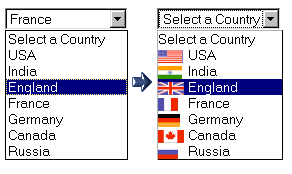
HTML Code
<label for="some_countries">Straight Forward</label>
<select name="some_countries" id="some_countries" class="icon-menu">
<option style="padding-left:0px;" value="">Select a Country</option>
<option style="background-image:url(flags/usa.png);" value="US">USA</option>
<option style="background-image:url(flags/india.png)" value="IN">India</option>
<option style="background-image:url(flags/england.png);" value="UK">England</option>
<option style="background-image:url(flags/france.png);" value="FR">France</option>
<option style="background-image:url(flags/germany.png);" value="GE">Germany</option>
<option style="background-image:url(flags/canada.png);" value="CA">Canada</option>
<option style="background-image:url(flags/russia.png);" value="RU">Russia</option>
</select>
CSS
select.icon-menu option {
background-repeat:no-repeat;
background-position:bottom left;
padding-left:30px;
}
This is enough to create the desired effect in Firefox. Of course, you must have the images of all the required flags. However, there is a problem with this code - inline CSS is used in the above example. If you want to separate presentation from content, you could use the following code...
HTML
<select name="countries" id="countries" class="icon-menu">
<option value="">Select a Country</option>
<option value="US">USA</option>
<option value="IN">India</option>
<option value="UK">England</option>
<option value="FR">France</option>
<option value="GE">Germany</option>
<option value="CA">Canada</option>
<option value="RU">Russia</option>
</select>
CSS
select.icon-menu option {
background-repeat:no-repeat;
background-position:bottom left;
padding-left:30px;
}
select#countries option[value="US"] {
background-image:url(flags/usa.png);
}
select#countries option[value="IN"] {
background-image:url(flags/india.png);
}
select#countries option[value="UK"] {
background-image:url(flags/england.png);
}
select#countries option[value="FR"] {
background-image:url(flags/france.png);
}
select#countries option[value="GE"] {
background-image:url(flags/germany.png);
}
select#countries option[value="CA"] {
background-image:url(flags/canada.png);
}
select#countries option[value="RU"] {
background-image:url(flags/russia.png);
}
Explanation
This example makes use of more advanced(Level 2) selectors to do the job.
select#countries option[value="IN"] {
background-image:url(flags/india.png);
}
This means that all option with value "IN" will be given the background image 'flag/india.png'.
Usage
So we come to the real question - do we use it? This will not working in IE - effectively making it useless for almost 90% of our visitors. Still, I will recommend that we use it - the code degrades beautifully if the browser don't support the option, it will show a default select menu - no mess, no fuss.
Read More...