Site Moved

This site has been moved to a new location - Bin-Blog. All new post will appear at the new location.

Bin-Blog

Naked Days are here again!

Once again, its time to take off your stylesheets. April 5th is the official Naked Day for websites. My sites Bin-Co and OpenJS will be naked for this day.

The idea behind this event is to promote Web Standards. Plain and simple. This includes proper use of (x)html, semantic markup, a good hierarchy structure, and; well, a fun play on words. I mean, who doesn't want to get naked?

I participated in this event the last year. Some thoughts from back then...

What about this site?

No - this site will not drop its stylesheets - in blogger it is just too much work.

What about You?

Will you be naked today? If so, post a comment with your URL.

Read More...

Semantic Pullquotes

"Pullquotes are basically some important text in the content that is repeated on a side with emphasis"

Roger Johansson of the 456 Berea st. recently wrote an article on how to make pullquotes using javascript. Pullquotes are basically some important text in the content that is repeated on a side with emphasis so that people will notice it sooner. This is often seen in magazines. Example to the right...

The method he used is to give the needed text a class, pull out the text using javascript and show it in the side. See original article for more details and code.

Advantages of this method

Avoids redundancy

This approach avoids having to enter the same content twice in the page. If you are using a pullquote, you will already have that text somewhere in the page.

A few problems with this approach

JavaScript is used for structure

JavaScript is used to create the pullquote - basically doing the job that rightfully belongs to (X)HTML. However, this don't really bother me - I am not that much of a purist. This feature also avoids redundancy of the text - which brings me to my next point.

Misses out on SEO advantage

The redundancy in the quote, propably containing some of our target keywords, is a good thing from an SEO point of view. Using this method will eliminate that advantage.

Not semantic

The 'span' tag is free of any semantic meaning - and frowned on in many purist circles. But, as I said earlier, it don't bother me much(I use spans liberally). But in this case, there is an opportunity do this right - using semantic markup is very easy...

<blockquote class="pullquote"><p> ... pullquote ... </p></blockquote>

...if you don't have issues about quoting yourself.

Text can't be changed

You will have to use the text exactly as it appears in the body - you will not be able to make any changes to it. Often you want to make cosmetic changes to the text before you make it a pullquote.

Don't need javascript

If someone who has a good browser(supports CSS) is surfing with Javascript turned off, he will not be able to see the effect.

Purely Semantic Method

A much simpler method of doing this is to just the proper markup to insert the quote and using CSS to position the text wherever you want. You don't really need JavaScript for doing this.

(X)HTML

<blockquote class="pullquote"><p> ... pull quote ... </p></blockquote>

CSS

This code is taken from the original article. Change it to fit your design.


.pullquote {
 float:right;
 width:10em;
 display:block;
 margin:0.25em 0.75em 0.25em 1em;
 padding:0.5em;
 border:3px double #ccc;
 border-width:3px 0;
 color:#333;
 background-color:#f0f0f0;
 font:italic 1.3em/1.3 Georgia;
}
.pullquote p {
 margin:0;
 text-align:center;
}
Read More...

Skip Links

Skip Links are the links given at the top of the page that lets the users skip directly to the content area. This is important if there is lot of navigational elements before the content. You can use CSS to hide these links for visual browsers - but if the users is browsering with an older browser(lynx) or PDAs or mobile phones, he should be able to skip the navigational links and jump directly to the content.

Result

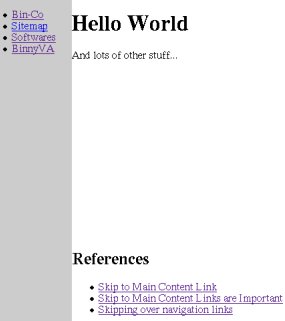
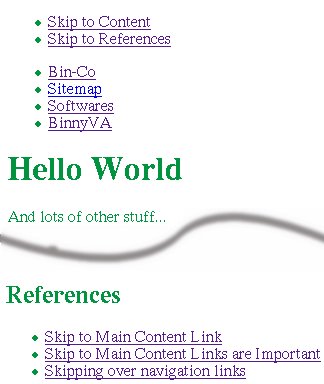
If done correctly, this technique will create this effect...

With CSS

Look Ma! No skip links
Appearence of the page with CSS

Without CSS

Easy Shortcuts to everywhere at the top
If CSS is not there, the skip links are shown.

Example


<html><head>
<title>Skip Links</title>
<style type="text/css">
#skip-links {
 display:none;/*Hide the links from Visual browsers*/
}
/* .. Other Styles ... */
</style>
</head>
<body>

<div id="skip-links">
 <ul>
  <li><a href="#content">Skip to Content</a></li>
  <li><a href="#references">Skip to References</a></li>
 </ul>
</div>

<div id="navigation">
 <ul>
  <li><a href="http://www.bin-co.com/">All Navigational Links</a></li>
  <li><a href="http://www.bin-co.com/sitemap.php">This could be long</a></li>
 </ul>
</div>

<div id="content">
 <h1>Hello World</h1>
 And lots of other stuff...<br />
 
 ... Lots of stuff here ...
 
 <div id="references">
  <h2>References</h2>
  <ul>
  <li><a href="http://www.washington.edu/accessit/AU/tutorial/ins.html">Skipping over navigation links</a></li>
  </ul>
 </div>
</div>

</body>
</html>

Filed Under...

Read More...

Accesskeys - Assigning Shortcuts for your Web Pages

Accesskeys let the web developer assign shortcut keys to an element. This is very easy to do - just put accesskey="CHARACTER" attribute in the element which you wish to create a shortcut for. Pressing an access key assigned to an element gives focus to the element. For example, when a user activates a link defined by the A element, the user agent generally follows the link(IE just focus on the link - you will have to press enter to follow it). When a user activates a radio button, the user agent changes the value of the radio button.

The following elements support the accesskey attribute: A, AREA, BUTTON, INPUT, LABEL, and LEGEND, and TEXTAREA. Some examples...

<a href="http://www.google.com/" accesskey="g">Google</a>
OR
<input type="text" name="name" accesskey="n" value="Binny" />

Problems

If this is so easy to do, why are people not using this? Unfortunately, there is some severe problems with accesskeys. A few are given below.

  • Conflicts with the Browser's shortcuts.
  • Visitors don't know which accesskeys are assigned to an element.

Solutions

Fortunately the second issue, can be solved in the following ways...

Convention

Use some common accesskeys everywhere - this is how it is done in application development. In any application, the shortcut for saving a file will be Ctrl+S. Copy will be Ctrl+C. Due to the repeated use of the same shortcuts, the users will be able to wade through different applications without much trouble. Unfortunately, in the web there is no such conventions. Even if some sites suggest some conventions, the keys they suggest will be different from the keys suggested in other pages. For example, see a tutorial on accesskeys and W3C's recommendations on accesskeys.

I will always recommend that we use W3C's recommendations - so here we use W3C's conventions.

  1. Home: access key "1" leads back to the service's home page.
  2. Skip Navigation: access key "2"
  3. Documentation: access key "3" leads to the documentation index for the service.
  4. Feedback: access key "4" leads to the feedback instructions.

Display

We can show the available Access keys using CSS - there is an excellent write up on how to do this at A List Apart. From the article...

The first problem is that visitors to your website have no way of knowing that you’ve assigned accesskey attributes to your linked elements. Even if they suspect you have, they would have to guess which accesskeys assignments you’ve created. In this article, we’ll look at how to solve this problem, enabling you to clearly but unobtrusively let your visitors know which accesskeys correspond with the links on a page.
Read More...

Happy Naked CSS Day Everyone

Happy Naked CSS Day everyone. I know its kinda late - but still I hope you had fun. Just 6 more hours to go, so if you want to see my site naked, this may be your last chance.

For those who used the PHP code I provided yesterday, I am very, very sorry. There was a small glitch in it - basically making it useless. I did not find this problem until it was very late. Simple mistake - some brackets were missing. Anyway, the problem was this...


// ...
if((gmdate("d") == 5 and gmdate("m") == 4) //If it is the fifth of april, take down the styles.
 or ($_REQUEST['preview'] == 'nostyles') 
 and (!$_SESSION['onstyles'])) { 
// ...

The code should have been...


// ...
if(((gmdate("d") == 5 and gmdate("m") == 4) //If it is the fifth of April, take down the styles.
 or ($_REQUEST['preview'] == 'nostyles'))
 and (!$_SESSION['onstyles'])) { 
// ...

Notice the absence of some parenthesis in the upper code. That caused all the trouble. Sorry about that. I really should invest more time in testing my scripts before publishing it.

Benefits of the Day

I learned some lessons I about accessibility today. I will be implementing these ideas into my site - some will be done before long, others will take some time.

Site Search
I did not have a search for my site - but I am going to implement Google's Search on my site. I have already developed a prototype - and it is just a matter of a few days before I implemented it into my design. Search is a very important part of a site. Jakon Nielsen, the usability guru have written about search in his Alertbox columns.
Search is the user's lifeline for mastering complex websites. The best designs offer a simple search box on the home page and play down advanced search and scoping.
Home Page
Home page is very important part of the site - unfortunately, I have not send enough time on it. I really have to redesign the home page to make the vistors feel more at home(sorry about the pun).
Visual Design
The lack of design today had been an eye-opener - I found that my site look better with the designs off! I really have to re-design the site. Maybe give it a little Web 2.0 look.

Filed Under...

Read More...

Preparations for Naked CSS Day

Six more hours before the Naked CSS Day is upon us. Just some points I want to make before we get to that.

First of all my sudoku pages will not be completely naked. The general formatting will be removed but the formatting for the sudoku puzzle tables will stay. This is because the layout is an important part of the functionality of puzzles.

Next, please feel free to let me know if you find any problems - or if you have any suggestions or any feedback. Just leave me a comment and I will look into it.

I have created a small PHP script that will let your visitors turn on the styles. Jut put this text in the Naked Day notification message...


You can <a href="?styles=1">Turn on the styles</a> if you wish.

Now put this PHP code in the common file...


//This goes at the top of the file
session_start(); //If you have not already started it.
if($_REQUEST['styles'] == 1) {
 $_SESSION['onstyles'] = 1;
}
// .. Lots of code ...

if((gmdate("d") == 5 and gmdate("m") == 4) //If it is the fifth of april, take down the styles.
 or ($_REQUEST['preview'] == 'nostyles') 
 and (!$_SESSION['onstyles'])) { 
   $style_info = '';
   $nostyles_msg = '<h3>What happened to the design?</h3>
<p>To know more about why styles are disabled on this website visit the
<a href="http://naked.dustindiaz.com" title="Web Standards Naked Day Host Website">
Annual CSS Naked Day</a> website for more information.<br />
You can <a href="?styles=1">Turn on the styles</a> if you wish.</p>';
  }

Please refer yesterday's post for more info.

Filed Under...

Read More...

Annual Naked (X)HTML Day

Dustin Diaz has called for the first Annual Naked (HTML) Day on April 5th. Needless to say, I'm in. I did a lot of work to make my site valid - in terms of validation, usability and accessibility - knowing full well that very little people will appreciate it. I mean, how many people browse the web without the stylesheets? These guys will never see the work I did - because they will only see the pretty colors. At last, I have a chance to show them what I have gone thru while making the site.

If you want to participate(and I recommend that you do), go to the CSS Naked Day page of the site. All the details you need is given in that page.

The idea behind this event is to promote Web Standards. Plain and simple. This includes proper use of (x)html, semantic markup, a good hierarchy structure, and; well, a fun play on words. I mean, who doesn't want to get naked?

If you want to see how a site looks like without its cloths - I mean CSS, just get the Web Developer extension, install it, go to the site and hit Ctrl+Shift+S. Voila - now the page will be shown without any CSS formatting. Of course, you will need firefox for this to work.

My site will automatically switch to the non-CSS version when it is April fifth. I used the PHP code...


//This code is for Dustin Diaz's Naked day.
$style_info = '<link rel="stylesheet" href="'.${rel}.'style.css" type="text/css" media="all" />
<!--[if IE]>
<link rel="stylesheet" href="'.${rel}.'style_ie.css" type="text/css" media="all" />
<![endif]-->';

if((gmdate("d") == 5 and gmdate("m") == 4) or ($_REQUEST['preview'] == 'nostyles')) { //If it is the fifth of april, take down the styles.
 $style_info = '';
 $nostyles_msg = "<div id='nostyles'>Hello World</div>";
}

If you just can wait to see the naked version of my site, use the preview function.

Read More...

"Don't Make me Think" by Steve Kurg

I just finished reading the book "Don't Make Me Think" by Steve Kurg. It is a book on web acessablility and I would recommend it if you are in web designing. It is well written, witty and has very valid information on how do design so that the site may be easier to use.

There is one point I have to share here - people will not read something on the web if it is long - but if you manage to compress the same information into one small sentence, over 90% of you visitors will read it. Now, if I had followed my own advice, the last sentence will look like this...

Users love small sentences.

The next book I have to read is "Web Design Acessability" by Jacob Nielsen - much larger than "Don't Make me Think", but more detailed.

Filed Under...

Categories : Technorati Tags:
Read More...

Alertbox's article on Blog Usability

Jakob Nielsen, the author of Alertbox has publish an article about the usability of Blogs. This contains some solid advice on how to make your blog much more 'visitor-friendly'.

I have one point of disagreement with him - Calendar navigation. Even though I agree that it should not be the only mode of navigation, I will not say that it is useless. If I visit a new blog and is thinking about subscribing its RSS feed, I take a look at the calendar before doing so. If a lot of days have posts in them, the blog is an active one. This is the reason why I created my own calender even though blogger did not give that option. Read the article...
Technorati Tags:
Del.icio.us Tags :
Read More...

Subscribe to : Posts